

Introduction#
ESP-IDF allows users to control many aspects of the build process and behavior of the resulting application. In other words, it allows you to configure even the finest details of the project. Configuration, especially in frameworks such as ESP-IDF, is a complex task consisting of several steps.
We will first explain how configuration works in ESP-IDF v5, which has been a standard for a long time. We also demonstrate how default values are managed in ESP-IDF v5 and specify what is the issue with the current solution and how we can overcome it.
Then, we will move to the new process of managing default values, which is available in the ESP-IDF v6.0. We will learn how this configuration system handles default values and how their behavior differs from the previous version when idf.py menuconfig is executed. We will also explain what is a default value conflict and how to resolve it with the idf.py refresh-config command, available in ESP-IDF v6.1+ and what are the alternatives for ESP-IDF v6.0.
Configuration in ESP-IDF v5 and Older#
Let’s briefly explain how configuration worked in ESP-IDF v5 and older and we actually mean by the term “configuration”.
In our context, configuration is a way how to:
- Define config options.
- Assign values to them.
- Expose the resulting mappings (
CONFIG_NAME=current_config_value) to the rest of the project (e.g. C/C++ code or CMake).
The first step is handled through a Kconfig file, the second step is realized via idf.py menuconfig (or automatically during the build) and the third is achieved via sdkconfig file.
Kconfig File#
The Kconfig file contains the definitions of config options: their names and other properties, such as default values, which are especially relevant in this context.
Every config option is identified by its name, which written in capital letters and directly follows the config keyword. Default values are specified on lines starting with the default keyword, followed by the value itself and, optionally, a condition introduced by the if keyword.
Let’s see an example:
config OPTION
    int "Config option demonstrating default values"
    help
        This config option helps us understand default values in ESP-IDF configuration.
    default 1 if CONDITIONAL_OPTION
    default 0

config CONDITIONAL_OPTION
    bool "Config option to condition of the default values"
    default y
Default Value Evaluation#
Default values are used for config options that have not been explicitly set by the user (they don’t have a user-set value). When you build a fresh project for the first time, all config options are initialized to their default values. These values can later be adjusted using a configuration tool (such as idf.py menuconfig).
Let’s explain the process how configuration system evaluates which default value should be assigned to given config option for both example config options (OPTION and CONDITIONAL_OPTION).
We will start with the OPTION config option, which has two rows defining default values:
default 1 if CONDITIONAL_OPTIONdefault 0
Rules to decide which default value will be used are quite simple. Configuration system analyzes rows from top to bottom and checks whether the condition for each default value is true. If the condition is true or a default value has no condition, we use that line immediately:
- Starting with
default 1 if CONDITIONAL_OPTION, the condition which is needed to be evaluated is simplyCONDITIONAL_OPTION.- In order to evaluate the condition, it is needed to evaluate the (default) value of
CONDITIONAL_OPTION. - There is only one default value ofr
CONDITIONAL_OPTION,default y. It has no condition, so the configuration system uses the valueyforCONDITIONAL_OPTION. Theysymbol is just a Kconfig way how to denote true.
- In order to evaluate the condition, it is needed to evaluate the (default) value of
- Condition for the line
default 1 if CONDITIONAL_OPTIONis evaluated asy/true. - Condition is therefore met and the default value for our
OPTIONshould be 1.
Sdkconfig File#
When we build fresh project for the first time, configuration system collects all the Kconfig files relevant for our project and assigns default value to each config option as we described in the previous section. This creates the mapping CONFIG_NAME=current_config_value, which is then stored into the sdkconfig file.
sdkconfig file, format-specific files are also created, such as sdkconfig.h and sdkconfig.cmake, exposing these mappings to the rest of the project. The mappings are the same there, only adjusted for given application format.For the example Kconfig file we have seen in the previous section, the content of the corresponding sdkconfig file will be:
CONFIG_CONDITIONAL_OPTION=y
CONFIG_OPTION=1
All the config options got a CONFIG_ prefix. This helps distinguish between a config option and other types of variables when using them e.g. in the C/C++ code. This means that OPTION in Kconfig and CONFIG_OPTION in sdkconfig file are the same config option.
The configuration system behaved according to the algorithm described in the previous section and assigned set our OPTION to 1.
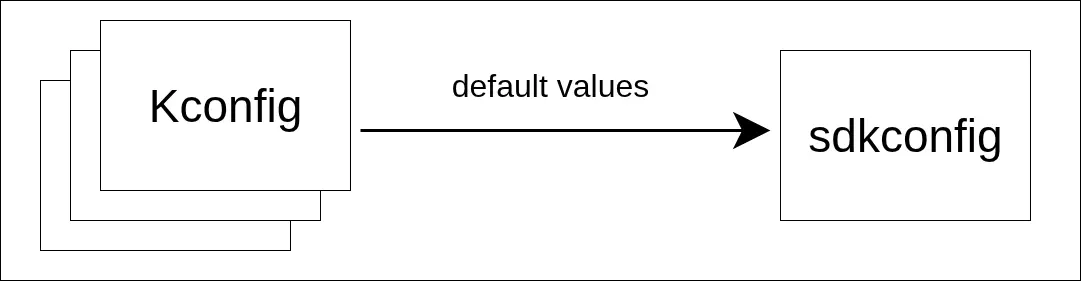
During the first configuration run in ESP-IDF v5, default values from Kconfig files are stored in sdkconfig file.
However, an essential part of the configuration is the ability to change the values of config options. In ESP-IDF, there are several ways how to achieve this, one of the most straightforward is being menuconfig.
When the idf.py menuconfig command (or project build) is run this time, the configuration system loads both the Kconfig files and the sdkconfig file, initializing all the config options to the values stored in there.
If CONDITIONAL_OPTION gets disabled in menuconfig, the sdkconfig file will look like this:
# CONFIG_CONDITIONAL_OPTION is not set
CONFIG_OPTION=1
If you look at the definition of the OPTION config option from the Kconfig, you can spot a certain “inconsistency”; even though CONDITIONAL_OPTION is disabled, OPTION is still set to 1.
As said before, configuration system saves the values for all config options in the sdkconfig file. However, when it loads those values back, it “locks” config options on those values – meaning their default values (as we saw them in Kconfig file) will no longer be in use and only user-made changed will be applied. This can lead to confusing situations, like the one just described.
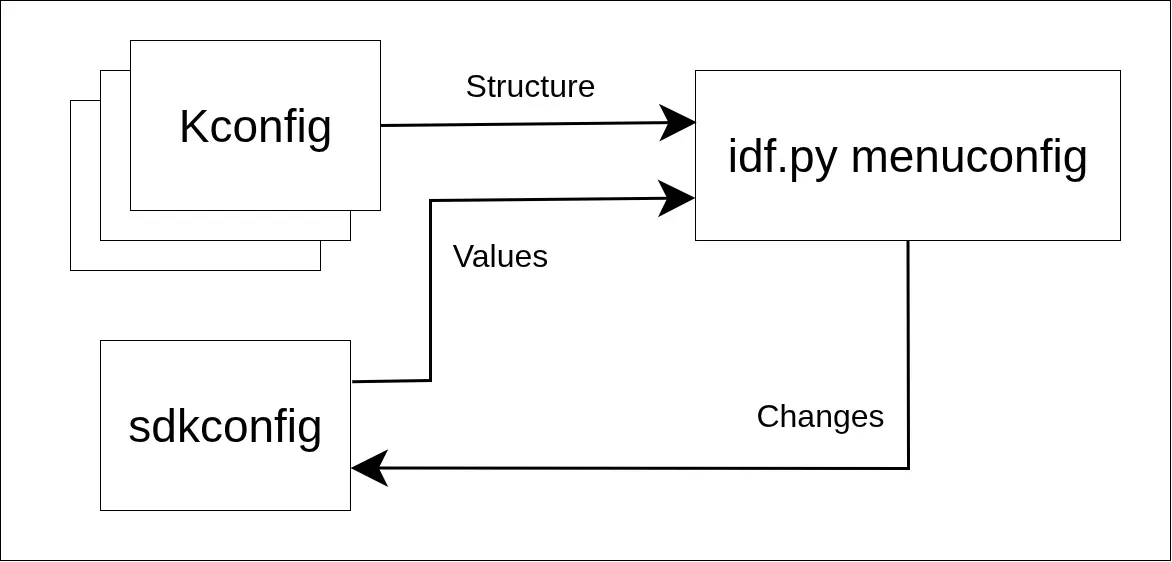
How menuconfig loads and saves values in ESP-IDF v5.x
Configuration in ESP-IDF v6#
The new configuration system, which is available in ESP-IDF v6.0 and newer, solves this problem by storing not only the value for every config option, but also the information whether the value is user-set or default. Let’s go through the process again and explain the differences.
When a fresh project is built for the first time, configuration system loads the relevant Kconfig files and saves default values to the sdkconfig file like before, but this time it adds additional # default: marks:
# default:
CONFIG_CONDITIONAL_OPTION=y
# default:
CONFIG_OPTION=1
All config options with default values are now marked with a # default: mark right above them. The configuration system now knows which config options should be re-evaluated during the menuconfig session, because their default values may change.
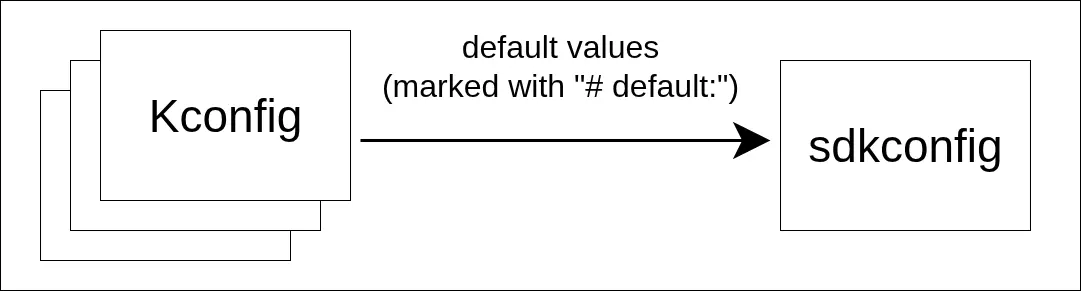
Starting with ESP-IDF v6, sdkconfig also stores information whether given option is default or not for every config option.
Let’s run menuconfig once again, disable CONDITIONAL_OPTION and save it:
# CONFIG_CONDITIONAL_OPTION is not set
# default:
CONFIG_OPTION=0
The CONDITIONAL_OPTION option no longer have the # default: mark, which is expected since we manually assigned user-set value to it. What is noteworthy is that OPTION registered this change; the original condition for the first default value is no longer valid, so the system now applies the second default value instead.
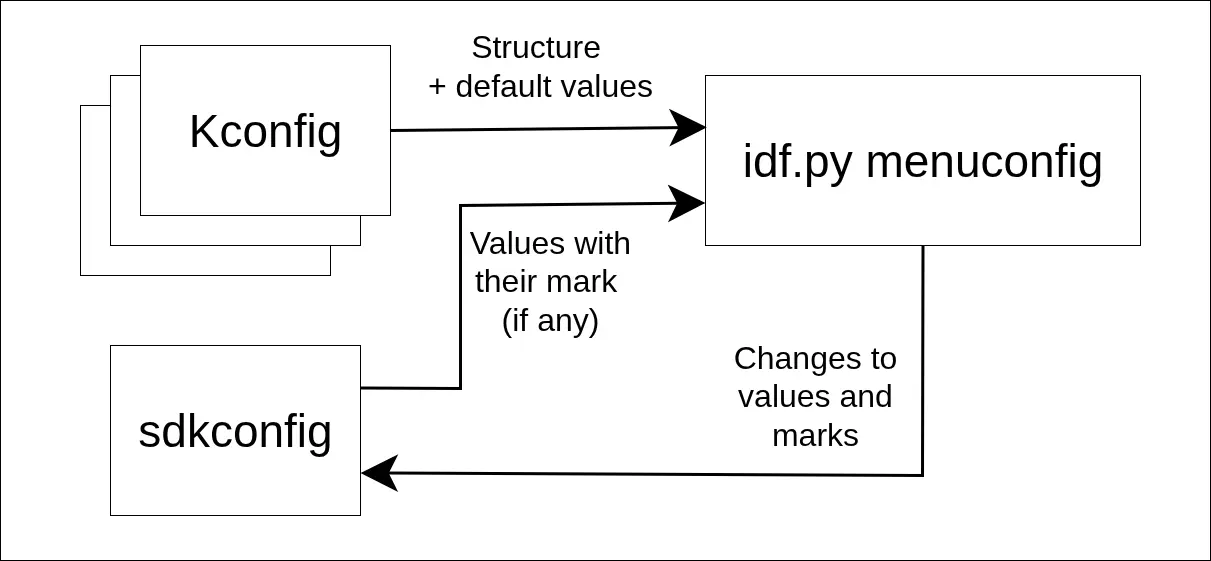
How menuconfig loads and saves values in ESP-IDF v6.x
Default Value Conflicts#
Default value obtained from the Kconfig file can be different than the one saved in sdkconfig for some config options in certain situations. We will explain how these situations occur and how to resolve them.
Let’s suppose OPTION was a part of a component. In the new release of the component, its definition (namely the default value) has changed:
config OPTION
    int "Prompt for config option"
    help
        New version of OPTION.
    default 99 # different from the previous version!
If the component version inside the project is updated, the next time the project is rebuilt or menuconfig is run, the configuration system will have two contradicting pieces of information:
- Kconfig file says that the default value for
OPTIONis 99. - sdkconfig file says that it is 0.
The configuration system handles this by first notifying the user:
info: Default value for OPTION in sdkconfig is 0 but it is 99 according to Kconfig.
Then, configuration system chooses one of those values based on its policy, which specifies the “preferred source” for default values. Depending on the policy, configuration system can either prefer the sdkconfig default value, Kconfig default value or let the user interactively decide which value to use for every config option individually.
By default, the policy is set to favor sdkconfig. It is a backward compatible behavior ensuring the same values will be passed to build system if configuration was not changed by the user, even after e.g. component update.
But we may want to use the new default value from Kconfig (new component version relies on that value or it is just favorable for us). Or, if there is not only one config option that has changed, but several, we want to choose which default value to use separately for each config option.
idf.py refresh-config#
The idf.py refresh-config command, which is available in ESP-IDF v6.1+, solves default value conflicts in respect to the policy specified by --policy argument, which can have following values:
sdkconfig: default values from sdkconfig file will be used. In our case, theOPTIONconfig option would have default value 0.kconfig: default values from Kconfig file will be used. That means theOPTIONconfig option would have the value 99.interactive: this option allows the user to choose the source of default value for each affected config option manually.
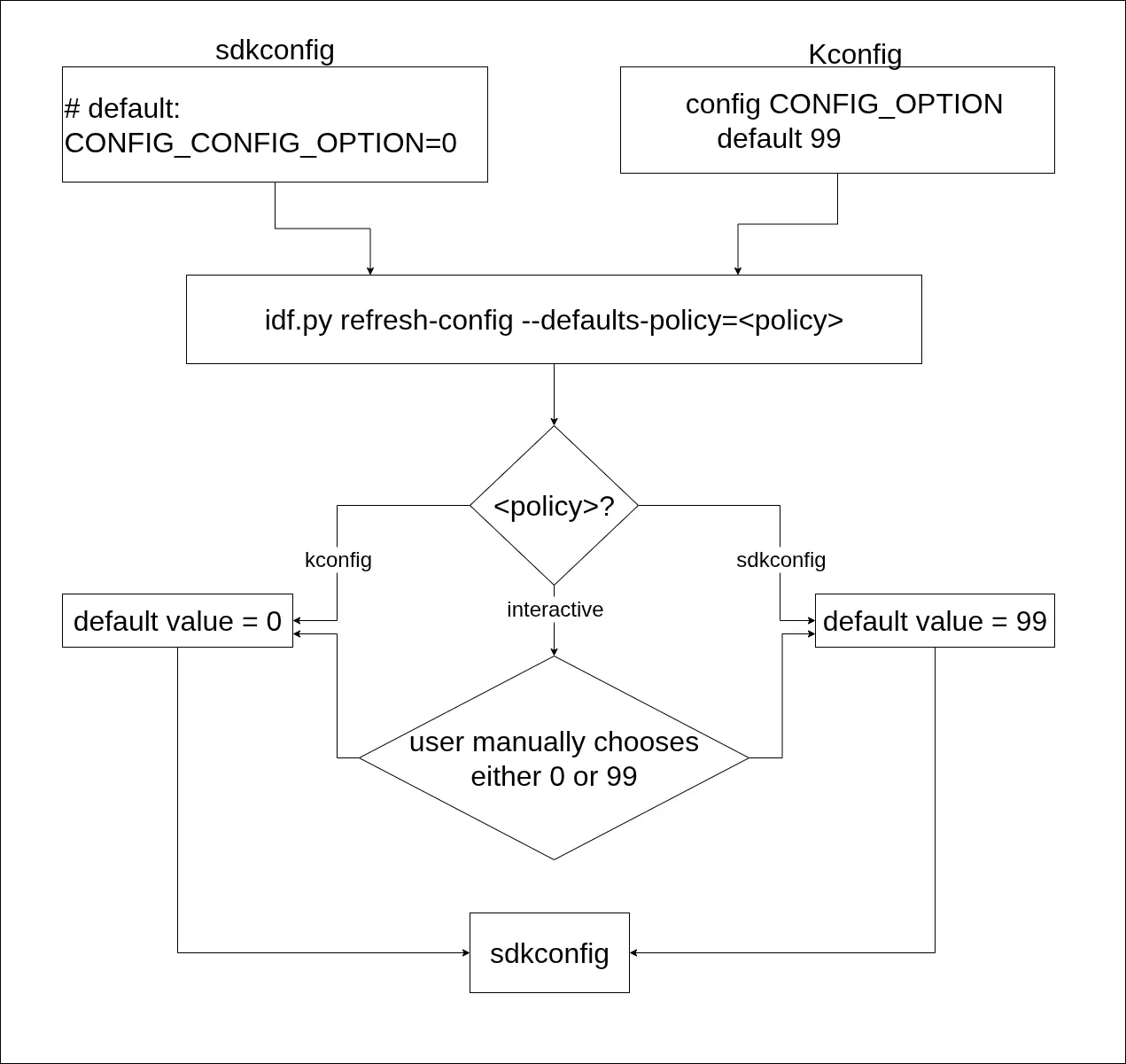
How idf.py refresh-config works based on defaults policy chosen
Conclusion#
In this article, we explained:
- How default values work in ESP-IDF v5 and the limitations of the current approach
- The new default value management system introduced in ESP-IDF v6.1
- What default value conflicts are and how they can occur during component updates
- How to resolve conflicts using the new
idf.py refresh-configcommand with different policies
The new configuration system in ESP-IDF v6 provides more intuitive behavior for default values while maintaining backward compatibility. ESP-IDF v6.1 also provides users with control over how conflicts are resolved.
Further Reading#
- Kconfig language description: https://docs.espressif.com/projects/esp-idf-kconfig/en/latest/kconfiglib/language.html
- Migration guide for the configuration system (esp-idf-kconfig): https://docs.espressif.com/projects/esp-idf-kconfig/en/latest/developer-guide/migration-guide.html
- In-depth default value explanation: https://docs.espressif.com/projects/esp-idf-kconfig/en/latest/kconfiglib/defaults.html
- ESP-IDF Project Configuration Guide: https://docs.espressif.com/projects/esp-idf/en/latest/esp32/api-guides/kconfig/index.html
- ESP-IDF Component Configuration Guide: https://docs.espressif.com/projects/esp-idf/en/latest/esp32/api-guides/kconfig/component-configuration-guide.html