

Introduction#
General-purpose input/output (GPIO) pins are one of the core interfaces on Espressif SoCs, allowing the device to interact with external components and signals. In the first part of this series, we explored how a GPIO can be configured and used as an output
In this second part, we will see how to use a GPIO as an input, how to deal with its high impedance, and which strategies are available to read its value.
Input configuration#
When configuring a GPIO as an input, you don’t need to set parameters like driving strength. GPIO inputs present high impedance, meaning they draw very little current from connected circuits. This is ideal for interfacing with sensors, as it minimizes the load on them.
However, this high impedance creates a challenge when reading digital signals. For example, if you connect a GPIO directly to a button without any additional components (see Fig.1) the voltage at the pin is undefined when the button is not pressed. Reading this undefined voltage can produce random values.

Fig.1 - Undefined input value
For this reason, a pull-up or pull-down resistor is usually added to the circuit. This way, when the button is not pressed, the resistor defines the idle voltage: with a pull-up the pin is held close to VDD (see Fig.2), while with a pull-down it is held close to GND.
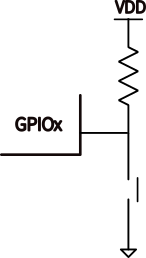
Fig.2 - Pull-up resistor
Modern microcontrollers offer internal pull-up or pull-down resistors that can be configured via firmware.
In ESP-IDF, the function used for this is aptly named gpio_set_pull_mode.
We can now move to the reading strategies: polling and event-driven callbacks.
Polling#
The simplest way to read a GPIO is to read its value directly using the function gpio_get_level.
Suppose we want to write a firmware to print “Button pressed” using this function and the boot button on a DevKit. In the ESP32-C61-DevKitC, it is connected to GPIO9.
After including the library (as shown in Part 1), we need to configure it.
We need to:
- Define the
bootbutton GPIO#define BUTTON_GPIO 9 // GPIO9 on most DevKits - Set the direction as input
gpio_set_direction(BUTTON_GPIO, GPIO_MODE_INPUT); - Set the pull mode to pull-up
gpio_set_pull_mode(BUTTON_GPIO, GPIO_PULLUP_ONLY);Thebootbutton is connected to the ground, so we need a pull-up resistor as shown Fig.2. If the button were connected to VDD, then we should have selected the pull-down option. - Create an infinite loop to read the button value
The main function looks like this:
void app_main(void)
{
    gpio_set_direction(BUTTON_GPIO, GPIO_MODE_INPUT);
    gpio_set_pull_mode(BUTTON_GPIO, GPIO_PULLUP_ONLY);

    while (1) {
        int level = gpio_get_level(BUTTON_GPIO);
        if (level == 0) {
            printf("Button pressed\n");
        } else {
            printf("Button released\n");
        }
        vTaskDelay(pdMS_TO_TICKS(200)); // required to avoid WDT timeout
    }
}
The output is:
[...]
Button released
Button released
Button pressed
Button released
[...]
This strategy is called polling: you keep asking the relevant resource about its status.
It works, but it’s highly inefficient. It would be better if the GPIO input pin could notify the firmware when the button is pressed.
This is what it’s called an event-driven strategy.
Event-driven strategy#
A smarter way to detect button presses is using interrupts and callback functions. To illustrate these concepts, we will use the same application as in the previous section.
But first, let’s see what are an interrupt and an interrupt service routine (ISR).
What is an interrupt#
An interrupt is a hardware or software signal that tells a microcontroller to pause its current task and immediately handle an important event. When an interrupt occurs, the MCU saves its current state and runs a special function called an ISR. After the ISR finishes, the MCU returns to whatever it was doing before the interrupt happened.
Interrupt sources include timers expiring, GPIO events, PWM events, and many others.
We will focus on the interrupts generated by GPIOs.
GPIO interrupt types#
A GPIO input can have a value of one or zero and switch between these two values. A signal at a GPIO input is represented by a pulse like the one in Fig. 3.

Fig.3 - GPIO interrupt types
ESP-IDF can trigger an interrupt at different points of the pulse. The complete list is in the following table.
| Interrupt type | Description |
|---|---|
GPIO_INTR_DISABLE | Interrupt disabled |
GPIO_INTR_POSEDGE | Trigger on rising edge |
GPIO_INTR_NEGEDGE | Trigger on falling edge |
GPIO_INTR_ANYEDGE | Trigger on both edges |
GPIO_INTR_LOW_LEVEL | Trigger on low level |
GPIO_INTR_HIGH_LEVEL | Trigger on high level |
You can specify the interrupt type associated with a GPIO using the function:
gpio_set_intr_type(BUTTON_GPIO, GPIO_INTR_NEGEDGE);
ISR callback function#
Once an interrupt is triggered, an ISR is called. You can define a callback function using the signature static void IRAM_ATTR function_name(void * arg).
IRAM_ATTR is an ESP-IDF macro that places a function in instruction RAM (IRAM) instead of flash, allowing it to execute faster.In our example, we want to print the same output as before.
static void IRAM_ATTR button_isr_handler(void *arg)
{
    ESP_EARLY_LOGI(TAG, "Button pressed");
}
ISRs should be as short as possible to avoid blocking the main execution. For this reason, some specific fast functions are available for use inside ISRs. One of these is ESP_EARLY_LOGI, which is the recommended alternative to ESP_LOGI.
To attach this ISR to the GPIO interrupt, we need to:
- Initialize the ISR service:
gpio_install_isr_service(ESP_INTR_FLAG_DEFAULT); - Add the handler function we created to the button interrupt itself:
gpio_isr_handler_add(BUTTON_GPIO, button_isr_handler, NULL); - Now the main loop becomes very simple.
 while (1) {
     vTaskDelay(pdMS_TO_TICKS(1000));
 }
Putting it all together#
The main function becomes more compact and robust.
void app_main(void)
{
    gpio_set_direction(BUTTON_GPIO, GPIO_MODE_INPUT);
    gpio_set_pull_mode(BUTTON_GPIO, GPIO_PULLUP_ONLY);
    gpio_set_intr_type(BUTTON_GPIO, GPIO_INTR_NEGEDGE);
    gpio_install_isr_service(ESP_INTR_FLAG_DEFAULT);
    gpio_isr_handler_add(BUTTON_GPIO, button_isr_handler, NULL);

    while (1) {
        vTaskDelay(pdMS_TO_TICKS(1000));
    }
}
When the button is pressed, the output is:
I (3183) button_example: Button pressed
You can find the complete code on the developer portal codebase.
Conclusion#
In this article, we explored how to configure GPIO pins as inputs in ESP-IDF. We discussed the importance of using pull-up or pull-down resistors to avoid undefined voltage levels when reading inputs, and demonstrated two different approaches for reading GPIO values: polling and event-driven interrupts. We also covered how to configure interrupt types and implement Interrupt Service Routines (ISRs) using the ESP-IDF GPIO API.
In the next article, we will explore the GPIO matrix and the opportunities it offers.