
Introducing ESP-IDF Installation Manager v0.8#
The ESP-IDF Installation Manager (EIM) is a cross-platform tool designed to simplify the installation and management of the Espressif IoT Development Framework. Version 0.8 introduces several notable enhancements, and in this article we will focus on:
- Native package manager EIM installation methods
- ESP-IDF offline installation
- Improved ESP-IDF environment activation
- CI/CD integration
- Version management
EIM addresses a common pain point in embedded development: configuring toolchains and dependencies across different operating systems. Whether you’re a developer working on a single project or part of a team requiring reproducible builds, EIM provides a consistent experience across Windows, macOS, and Linux.
EIM installation methods#
EIM 0.8 offers multiple installation options to suit different workflows and preferences.
Package Manager Installation (Recommended)#
The simplest way to install EIM is through your platform’s native package manager.
# Install GUI version
winget install Espressif.EIM
# Install CLI version only
winget install Espressif.EIM-CLI
# First add the EIM tap
brew tap espressif/eim
# Install GUI version
brew install --cask eim-gui
# Or install CLI version only
brew install eim
# Add the EIM APT repository
echo "deb [trusted=yes] https://dl.espressif.com/dl/eim/apt/ stable main" | \
    sudo tee /etc/apt/sources.list.d/espressif.list
# Update package lists
sudo apt update
# Install CLI version
sudo apt install eim-cli
# Or install GUI version
sudo apt install eim
# Download and install the RPM repository configuration
sudo dnf install https://dl.espressif.com/dl/eim/rpm/eim-repo-latest.noarch.rpm
# Install CLI version
sudo dnf install eim-cli
# Or install GUI version
sudo dnf install eim
Portable Binary Installation#
For users who prefer self-contained binaries or lack package manager access, visit the EIM downloads page for platform-specific binaries and detailed installation instructions.
ESP-IDF offline installation#
For air-gapped environments, networks with restricted access, or simply when you want the fastest and most reliable installation experience, EIM supports fully offline installation through pre-built archives.
Pre-packaged offline archives for every supported ESP-IDF version and platform are available at https://dl.espressif.com/dl/eim/?tab=offline.

Download the appropriate archive for your platform and ESP-IDF version, then install using:
# Install from a downloaded archive
eim install --use-local-archive /path/to/archive.zip
Offline installation is also available directly through the GUI for users who prefer a visual interface.
Why choose offline installation?
- Fastest method: Skip all downloads and verification steps—everything is already included
- Most reliable: No network issues, no server timeouts, no corrupted downloads
- Tested and verified: Each archive is pre-built and tested before publication
- Fail-safe solution: When other installation methods encounter issues, offline archives almost always succeed
- In areas with restricted or slow Internet: Windows users should consider using offline archives for the most consistent experience.
This method is particularly valuable for:
- Industrial environments with restricted network access
- CI/CD runners in private networks
- Team environments requiring consistent tool versions
- Users in regions with network connectivity challenges
Improved ESP-IDF environment activation#
Traditional ESP-IDF installation methods used install.sh and export.sh scripts from the IDF repository. EIM replaces these with a modern, cross-platform approach.
Installation is Now Simpler#
The install.sh script from the ESP-IDF repository is no longer needed. EIM handles all toolchain and dependency installation automatically through the commands described above.
Activation Scripts Replace export.sh#
The export.sh script has been replaced by version-specific activation scripts. After installing ESP-IDF with EIM, activate the environment by sourcing the activation script:
# Activate a specific ESP-IDF version
source ~/.espressif/tools/activate_idf_v5.3.2.sh
To find the activation script path for any installed version, use:
eim select
This command displays all installed versions along with their activation script paths.
Opening the IDF Shell#
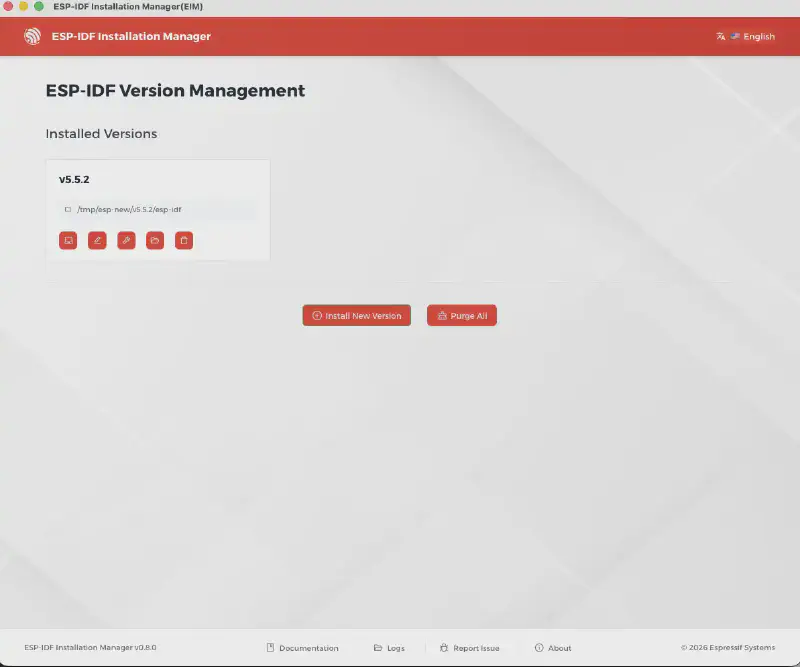
Across all platforms, you can open the IDF Shell from the EIM GUI: go to the Version Manager view and click “Open IDF Shell” next to the version you want. This launches a terminal with the ESP-IDF environment already activated.

On Windows, EIM also adds an IDF Shell shortcut to your desktop and an entry in the Windows Terminal dropdown menu for quick access.
CI/CD Integration#
EIM enables seamless automation in CI/CD pipelines, allowing you to install ESP-IDF and set up projects consistently across different environments.
Headless installation#
The EIM supports headless mode for automated installations. Actually the install command runs in non-interactive (headless) mode by default. You can configure params of the headless instllation by CLI commands like:
# Install specific version
eim install -i v5.3.2

# Custom installation path
eim install -p /opt/esp-idf
or if this gets too complex for your need you can use configuration file. All the detailed information about this can be found in the documentaion.
GitHub Actions#
For GitHub workflows, use the official install-esp-idf-action for GitHub workflows:
steps:
  - uses: actions/checkout@v4
  - name: Install ESP-IDF
    uses: espressif/install-esp-idf-action@v1
    with:
      version: "v5.0"
      path: "/custom/path/to/esp-idf"
      tools-path: "/custom/path/to/tools"
Docker Integration#
For Docker and containerized build environments, you can find comprehensive examples in the Headless Usage documentation.
Custom Repository Configuration#
For organizations using ESP-IDF forks with custom modifications:
# For GitHub repositories
eim install -i v5.3.2 --repo-stub my-github-user/my-custom-idf

# For GitLab or self-hosted repositories
eim install -i v5.3.2 --mirror https://gitlab.example.com --repo-stub my-gitlab-user/my-custom-idf
Version Management#
EIM makes it easy to manage multiple ESP-IDF versions on a single system. Switch between versions instantly without reinstalling tools.
You can quickly select your preferred ESP-IDF version from the GUI, as illustrated in the image below.
Documentation and Resources#
- EIM Documentation: https://docs.espressif.com/projects/idf-im-ui/en/latest/
- EIM Repository: https://github.com/espressif/idf-im-ui
- EIM Downloads: https://dl.espressif.com/dl/eim/
- ESP-IDF Documentation: https://docs.espressif.com/projects/esp-idf/en/latest/
Conclusion#
EIM 0.8 simplifies ESP-IDF installation across all major platforms through native package managers, supports offline deployments for restricted environments, and integrates seamlessly with CI/CD pipelines. Whether you’re setting up a new development machine or configuring automated builds, EIM provides a consistent and reliable installation experience.