

Introduction#
One typical IoT and industrial application is data logging. At its core, logging consists of measuring values (usually from sensors) and storing them in memory, making them accessible for external processing, visualization, and further analysis.
Data logging can take several forms, ranging from as simple as printing values to the serial port to more complex filesystem storage with cloud upload and visualization.
In this two-part tutorial series, we will create an environmental sensor logger with filesystem storage, provisioning, and cloud backup. The plan is as follows, along with the concepts we will explore:
- Logger with offline filesystem storage
- Filesystem (
littlefs) and sensor connection (I2C)
- Filesystem (
- Logger with provisioning and MQTT backup when internet is available
- FreeRTOS tasks and semaphores
We will be using the ESP32-C61-Devkit-C module with ESP-IDF VS Code extension, but you can easily adapt this tutorial to any ESP32* board and any IDE.
Project overview#
In this part, we will create a logger that reads data from a DHT20/AHT20 temperature and humidity sensor via I2C and stores the data in a littlefs filesystem. For this example, we will use a simple incremental timestamp starting from 0 at boot time. In the next part, we will add a proper timestamp obtained from an NTP server.
The steps are as follows:
- Connect the
DHT20sensor - Read the
DHT20sensor - Create the
littlefsfilesystem - Log the data in
.csvfiles - Read the data partition
Connect the DHT20 sensor#
The DHT20/AHT20 IC is a temperature and humidity sensor with I2C digital output. Its pinout consists of the two I2C pins (SDA and SCL) plus the supply pins (3.3V and GND).
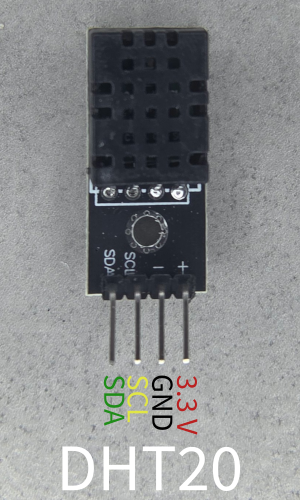
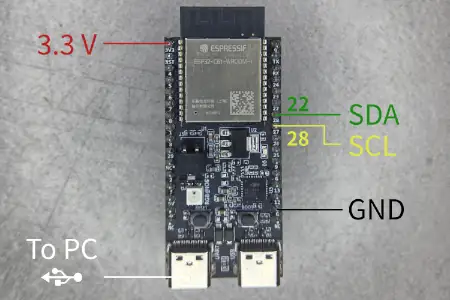
In this tutorial we will use the following connection to the ESP32-C61-Devkit-C.
| ESP32-C61-Devkit-C | DHT20 | Description |
|---|---|---|
| GPIO 22 | SDA | I2C SDA pin |
| GPIO 28 | SCL | I2C SCL pin |
| G | - | Ground |
| 3.3V | + | Supply |
Espressif DevkitC boards usually provide a few 3.3V and GND pins (usually labeled G). You can find the connection in Fig. 2.
Read the DHT20 sensor#
To read the sensor, we will use the AHT20 library on the ESP registry. As you can see on the component page, the command to add the dependency is idf.py add-dependency "espressif/aht20^2.0.0". This tool makes use of the i2c_bus component, hence we need to add it too.
The final goal of this section is to print on the terminal the sensor data every second.
Add dependencies#
Let’s start a new project and add the dependencies.
- Open VS Code
- Open the command palette and type
> ESP-IDF: Create a New Empty Project. - Create a new empty project and call it
basic-logger - Open an ESP-IDF terminal:
> ESP-IDF: Open ESP-IDF Terminal - On the terminal, type:
idf.py add-dependency "espressif/aht20^2.0.0" - On the same terminal, type
idf.py add-dependency "espressif/i2c_bus=*"
If you now open the main/idf_components.yml file, you’ll see
## IDF Component Manager Manifest File
dependencies:
  ## Required IDF version
  idf:
    version: '>=4.1.0'
  # # Put list of dependencies here
  # # For components maintained by Espressif:
  # component: "~1.0.0"
  # # For 3rd party components:
  # username/component: ">=1.0.0,<2.0.0"
  # username2/component2:
  #   version: "~1.0.0"
  #   # For transient dependencies `public` flag can be set.
  #   # `public` flag doesn't have an effect dependencies of the `main` component.
  #   # All dependencies of `main` are public by default.
  #   public: true
  espressif/aht20: ^2.0.0
  espressif/i2c_bus: =*
Prepare the I2C bus#
The I2C library is handled through the i2c_bus.h header file. To configure it, we need to choose the I2C port and its pins. Espressif modules have multiple I2C controllers we can use. In this case, we’ll choose port 0 and the pins we mentioned in the previous section. We will also enable internal pull-ups because the sensor board we’re using doesn’t include them.
In the
main.c, add the header file and the following defines#include <driver/gpio.h> // For GPIO_PULLUP_ENABLE #include "i2c_bus.h" #define AMBIENT_SENSOR_I2C_PORT 0 #define AMBIENT_SENSOR_SDA_IO GPIO_NUM_22 #define AMBIENT_SENSOR_SCL_IO GPIO_NUM_28 #define AMBIENT_SENSOR_I2C_FREQ_HZ 100000Now create the configuration
structfor the I2C peripheral// Configure I2C bus const i2c_config_t i2c_cfg = { .mode = I2C_MODE_MASTER, .sda_io_num = AMBIENT_SENSOR_SDA_IO, .sda_pullup_en = GPIO_PULLUP_ENABLE, .scl_io_num = AMBIENT_SENSOR_SCL_IO, .scl_pullup_en = GPIO_PULLUP_ENABLE, .master.clk_speed = AMBIENT_SENSOR_I2C_FREQ_HZ, };Create the
i2cbus handle.i2c_bus_handle_t i2c_bus_handle = NULL; *i2c_bus_handle = i2c_bus_create(AMBIENT_SENSOR_I2C_PORT, &i2c_cfg); if (*i2c_bus_handle == NULL) { ESP_LOGE(TAG, "Failed to create I2C bus"); return ESP_ERR_INVALID_STATE; }
Setup the DHT20 library#
To configure the sensor, we have to check the ESP registry component documentation.
- First, include the library
#include <esp_log.h> #include <esp_err.h> // for esp_err_t #include "aht20.h" - Create the configuration
structfor the sensor// Configure AHT20 sensor aht20_i2c_config_t aht20_cfg = { .bus_inst = *i2c_bus_handle, .i2c_addr = AHT20_ADDRRES_0, }; - Initialize the sensor
aht20_dev_handle_t aht20_handle = NULL;
esp_err_t ret = aht20_new_sensor(&aht20_cfg, &aht20_handle);Refactor sensor initialization#
To keep the main function clean and maintainable, we’ll encapsulate all this initialization logic in a dedicated esp_err_t ambient_sensor_init(aht20_dev_handle_t *, i2c_bus_handle_t *) function with debug logging.
Here you can find the ambient_sensor_init function code
#include "esp_log.h" // For ESP_LOGI
#define TAG "ambient_sensor"
esp_err_t ambient_sensor_init(aht20_dev_handle_t *aht20_handle, i2c_bus_handle_t *i2c_bus_handle) {
if (aht20_handle == NULL || i2c_bus_handle == NULL) {
ESP_LOGE(TAG, "Invalid arguments: aht20_handle or i2c_bus_handle is NULL");
return ESP_ERR_INVALID_ARG;
}
    // Configure I2C bus
    const i2c_config_t i2c_cfg = {
        .mode = I2C_MODE_MASTER,
        .sda_io_num = AMBIENT_SENSOR_SDA_IO,
        .sda_pullup_en = GPIO_PULLUP_ENABLE,
        .scl_io_num = AMBIENT_SENSOR_SCL_IO,
        .scl_pullup_en = GPIO_PULLUP_ENABLE,
        .master.clk_speed = AMBIENT_SENSOR_I2C_FREQ_HZ,
    };
*i2c_bus_handle = i2c_bus_create(AMBIENT_SENSOR_I2C_PORT, &i2c_cfg);
if (*i2c_bus_handle == NULL) {
ESP_LOGE(TAG, "Failed to create I2C bus");
return ESP_ERR_INVALID_STATE;
}
// Configure AHT20 sensor
aht20_i2c_config_t aht20_cfg = {
     .bus_inst = *i2c_bus_handle,
     .i2c_addr = AHT20_ADDRRES_0,
};
esp_err_t ret = aht20_new_sensor(&aht20_cfg, aht20_handle);
if (ret != ESP_OK) {
ESP_LOGE(TAG, "Failed to create AHT20 sensor: %s", esp_err_to_name(ret));
i2c_bus_delete(*i2c_bus_handle);
*i2c_bus_handle = NULL; // Avoid dangling pointer
return ret;
}
ESP_LOGI(TAG, "Ambient sensor created (I2C port=%d, SDA=%d, SCL=%d, freq=%d Hz)",
AMBIENT_SENSOR_I2C_PORT,
AMBIENT_SENSOR_SDA_IO,
AMBIENT_SENSOR_SCL_IO,
AMBIENT_SENSOR_I2C_FREQ_HZ);
return ESP_OK;
}From the app_main, we can call it
void app_main(){
    aht20_dev_handle_t aht20_handle = NULL;  // aht20_new_sensor likely allocates this
    i2c_bus_handle_t i2c_bus_handle = NULL;

    ESP_ERROR_CHECK(ambient_sensor_init(&aht20_handle, &i2c_bus_handle));
}
Read the sensor data#
We’re now ready to read the sensor data. We’ll create an endless loop that prints the sensor data every second.
The function to read the data is
aht20_read_temperature_humidity(aht20_dev_handle_t aht20_handle, uint32_t temperature_raw, float temperature, uint32_t humidity_raw, float humidity)Since it returns two values, we need to pass the variable pointers, which the function will then fill with the sensor data.
- Update the
app_mainfunction as follows:
#include <freertos/FreeRTOS.h>

void app_main(void) {
    ESP_LOGI(TAG,"Get started\n");

    aht20_dev_handle_t aht20_handle = NULL;
    i2c_bus_handle_t i2c_bus_handle = NULL;

    ESP_ERROR_CHECK(ambient_sensor_init(&aht20_handle, &i2c_bus_handle));

    uint32_t temperature_raw, humidity_raw;
    float temperature, humidity;

    while (1) {
        aht20_read_temperature_humidity(aht20_handle, &temperature_raw, &temperature, &humidity_raw, &humidity);
        ESP_LOGI(TAG, "%-20s: %2.2f %%", "humidity is", humidity);
        ESP_LOGI(TAG, "%-20s: %2.2f degC", "temperature is", temperature);
        vTaskDelay(pdMS_TO_TICKS(1000));
    }
}We need to include FreeRTOS.h for the delay vTaskDelay.
Create the little_fs filesystem#
We will store the data in a .csv file in a littlefs filesystem.
ESP-IDF also supports the spiffs or FAT filesystem, but little_fs has better folder support. For a detailed comparison, see the performance and benchmarks for LittleFS, SPIFFS and FAT.
little_fs is available as a component in the component registry, like the aht20 and i2c_bus modules we used in the previous sections.
To use the little_fs filesystem, we need to:
- Create the partition to host the filesystem
- Add the
little_fsdependency and include it - Initialize
little_fs
Create the partition to host the filesystem#
On the command palette, type:
> ESP-IDF: SDK Configuration Editor (sdkconfig)Type
Partition tablein themenuconfigsearch bar
Enable the Custom partition table CSV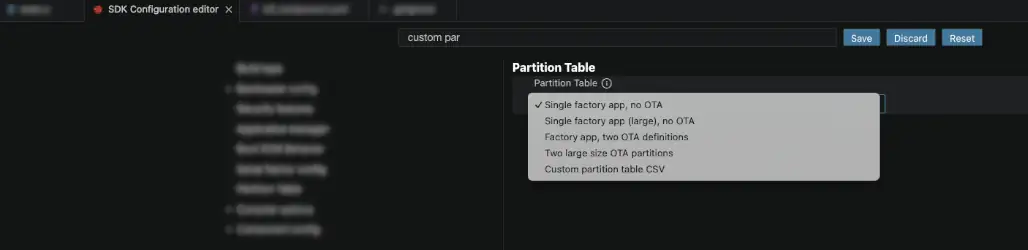
Copy the partition from
partitions_demo_esp_littlefs.csvin the example# Name, Type, SubType, Offset, Size, Flags # Note: if you have increased the bootloader size, make sure to update the offsets to avoid overlap nvs, data, nvs, 0x9000, 0x6000, phy_init, data, phy, 0xf000, 0x1000, factory, app, factory, 0x10000, 1M, storage, data, littlefs, , 0xF0000,On the command palette, type:
> ESP-IDF: Build, Flash and Start a Monitor on Your DeviceOn the terminal, you should now spot the following lines
Partition table binary generated. Contents:
*******************************************************************************
# ESP-IDF Partition Table
# Name, Type, SubType, Offset, Size, Flags
nvs,data,nvs,0x9000,24K,
phy_init,data,phy,0xf000,4K,
factory,app,factory,0x10000,1M,
storage,data,littlefs,0x110000,960K,
Add little_fs dependency and include it#
Add dependency
idf.py add-dependency "joltwallet/littlefs^1.22.1"Add include
#include "esp_littlefs.h"
Configure little_fs#
To keep the code clean, we’ll add all the little_fs logic into a void little_fs_init() function.
We will register it under the base path “/littlefs”, so we’ll be able to use the standard POSIX file APIs (like fopen) on paths starting with “/littlefs/”.
To verify that everything is correct, we’ll print some information about the partition.
- Add the following define with the partition name (“storage”)
#define PARTITION_LABEL "storage" - Before
app_main, add the following functionvoid little_fs_init(){ ESP_LOGI(TAG, "Initializing little_fs"); esp_vfs_littlefs_conf_t conf = { .base_path = "/littlefs", .partition_label = PARTITION_LABEL, .format_if_mount_failed = true, .dont_mount = false, }; esp_err_t ret = esp_vfs_littlefs_register(&conf); if (ret != ESP_OK) { if (ret == ESP_FAIL) { ESP_LOGE(TAG, "Failed to mount or format filesystem"); } else if (ret == ESP_ERR_NOT_FOUND) { ESP_LOGE(TAG, "Failed to find LittleFS partition"); } else { ESP_LOGE(TAG, "Failed to initialize LittleFS (%s)", esp_err_to_name(ret)); } return; } size_t total = 0, used = 0; ret = esp_littlefs_info(conf.partition_label, &total, &used); if (ret != ESP_OK) { ESP_LOGE(TAG, "Failed to get little_fs partition information (%s)", esp_err_to_name(ret)); esp_littlefs_format(conf.partition_label); } else { ESP_LOGI(TAG, "Partition size: total: %d, used: %d", total, used); } }
To manage the files, we can now use standard POSIX functions and C control flows like
FILE *f_temperature = fopen("/littlefs/temperature.csv", "w");
fprintf(f_temperature,"Some text\n");
Log the data in .csv files#
To log the data we need to:
- Get a timestamp
- Check if the logging files exist
- Write the log in the file
Get a timestamp#
As mentioned at the beginning of the article, we will use an incremental timestamp starting from 0 at boot time. We will use the time.h standard library.
- At the beginning of
main.c, add the include#include <time.h> - Before the
whileloop, declare a variablenowtime_t now; - Inside the while loop, add the following to store the current time in the
nowvariabletime(&now);
Check if the logging files exist#
Since we don’t want to overwrite the logging data every time the device boots, we need to check if the logging files for temperature and humidity already exist. If they don’t, we’ll create them, opening the file handler in write mode (w). Otherwise, we’ll append (a) the data to the existing files.
To check if a file exists, we’ll use the standard stat structure.
- Before the
whileloop, addstruct stat st; // status of files // If log files don't exist, create them and add header if (stat("/littlefs/temperature.csv", &st) != 0) { ESP_LOGI(TAG, "Log files not found, creating them..."); FILE *f_temperature = fopen("/littlefs/temperature.csv", "w"); FILE *f_humidity = fopen("/littlefs/humidity.csv", "w"); fprintf(f_temperature, "timestamp,temperature\n"); fprintf(f_humidity, "timestamp,humidity\n"); fclose(f_temperature); fclose(f_humidity); } else { ESP_LOGI(TAG, "Log files found, appending data..."); }
Write the log to file#
- Inside the
whileloop, addFILE *f_temperature = fopen("/littlefs/temperature.csv", "a"); FILE *f_humidity = fopen("/littlefs/humidity.csv", "a"); if (f_humidity == NULL || f_temperature == NULL) { ESP_LOGE(TAG, "Failed to open file for writing"); return; } fprintf(f_temperature, "%lld,%f\n", now, temperature); fprintf(f_humidity, "%lld,%f %%\n", now, humidity); fclose(f_temperature); fclose(f_humidity);
Your code should now look like the following.
Show full code
#include <stdio.h>
#include <stdlib.h>
#include <esp_log.h>
#include <esp_err.h>
#include <driver/gpio.h> // For GPIO_PULLUP_ENABLE
#include "i2c_bus.h"
#include "aht20.h"
#include <freertos/FreeRTOS.h>
#include "esp_littlefs.h"
#include <sys/stat.h> // for struct stat and stat()
#include <unistd.h> // for unlink()
// Define TAG for logging
#define TAG "ambient_sensor"
// Define actual GPIO pins (REPLACE with your values!)
#define AMBIENT_SENSOR_I2C_PORT 0
#define AMBIENT_SENSOR_SDA_IO GPIO_NUM_22
#define AMBIENT_SENSOR_SCL_IO GPIO_NUM_28
#define AMBIENT_SENSOR_I2C_FREQ_HZ 100000
#define PARTITION_LABEL "storage"
esp_err_t ambient_sensor_init(aht20_dev_handle_t *aht20_handle, i2c_bus_handle_t *i2c_bus_handle) {
if (aht20_handle == NULL || i2c_bus_handle == NULL) {
ESP_LOGE(TAG, "Invalid arguments: aht20_handle or i2c_bus_handle is NULL");
return ESP_ERR_INVALID_ARG;
}
// Configure I2C bus
const i2c_config_t i2c_cfg = {
.mode = I2C_MODE_MASTER,
.sda_io_num = AMBIENT_SENSOR_SDA_IO,
.sda_pullup_en = GPIO_PULLUP_ENABLE,
.scl_io_num = AMBIENT_SENSOR_SCL_IO,
.scl_pullup_en = GPIO_PULLUP_ENABLE,
.master.clk_speed = AMBIENT_SENSOR_I2C_FREQ_HZ,
};
*i2c_bus_handle = i2c_bus_create(AMBIENT_SENSOR_I2C_PORT, &i2c_cfg);
if (*i2c_bus_handle == NULL) {
ESP_LOGE(TAG, "Failed to create I2C bus");
return ESP_ERR_INVALID_STATE;
}
// Configure AHT20 sensor
aht20_i2c_config_t aht20_cfg = {
.bus_inst = *i2c_bus_handle,
.i2c_addr = AHT20_ADDRRES_0,
};
esp_err_t ret = aht20_new_sensor(&aht20_cfg, aht20_handle);
if (ret != ESP_OK) {
ESP_LOGE(TAG, "Failed to create AHT20 sensor: %s", esp_err_to_name(ret));
i2c_bus_delete(*i2c_bus_handle);
*i2c_bus_handle = NULL; // Avoid dangling pointer
return ret;
}
ESP_LOGI(TAG, "Ambient sensor created (I2C port=%d, SDA=%d, SCL=%d, freq=%d Hz)",
AMBIENT_SENSOR_I2C_PORT,
AMBIENT_SENSOR_SDA_IO,
AMBIENT_SENSOR_SCL_IO,
AMBIENT_SENSOR_I2C_FREQ_HZ);
return ESP_OK;
}
void little_fs_init(){
ESP_LOGI(TAG, "Initializing LittleFS");
esp_vfs_littlefs_conf_t conf = {
.base_path = "/littlefs",
.partition_label = PARTITION_LABEL,
.format_if_mount_failed = true,
.dont_mount = false,
};
esp_err_t ret = esp_vfs_littlefs_register(&conf);
if (ret != ESP_OK) {
if (ret == ESP_FAIL) {
ESP_LOGE(TAG, "Failed to mount or format filesystem");
} else if (ret == ESP_ERR_NOT_FOUND) {
ESP_LOGE(TAG, "Failed to find LittleFS partition");
} else {
ESP_LOGE(TAG, "Failed to initialize LittleFS (%s)", esp_err_to_name(ret));
}
return;
}
size_t total = 0, used = 0;
ret = esp_littlefs_info(conf.partition_label, &total, &used);
if (ret != ESP_OK) {
ESP_LOGE(TAG, "Failed to get LittleFS partition information (%s)", esp_err_to_name(ret));
esp_littlefs_format(conf.partition_label);
} else {
ESP_LOGI(TAG, "Partition size: total: %d, used: %d", total, used);
}
}
void app_main(void) {
ESP_LOGI(TAG,"Get started\n");
// Allocate handles (no need to malloc aht20_dev_handle_t directly)
aht20_dev_handle_t aht20_handle = NULL; // aht20_new_sensor likely allocates this
i2c_bus_handle_t i2c_bus_handle = NULL;
little_fs_init();
ESP_ERROR_CHECK(ambient_sensor_init(&aht20_handle, &i2c_bus_handle));
uint32_t temperature_raw, humidity_raw;
float temperature, humidity;
time_t now;
struct stat st; // status of files

  // If log files don't exist, create them and add header

  if (stat("/littlefs/temperature.csv", &st) != 0) {
      ESP_LOGI(TAG, "Log files not found, creating them...");
      FILE *f_temperature = fopen("/littlefs/temperature.csv", "w");
      FILE *f_humidity     = fopen("/littlefs/humidity.csv", "w");
      fprintf(f_temperature, "timestamp,temperature\n");
      fprintf(f_humidity, "timestamp,humidity\n");

      fclose(f_temperature);
      fclose(f_humidity);
  } else {
      ESP_LOGI(TAG, "Log files found, appending data...");
  }
int times = 4000;
while (times>0) {
time(&now);
aht20_read_temperature_humidity(aht20_handle, &temperature_raw, &temperature, &humidity_raw, &humidity);
ESP_LOGI(TAG, "%-20s: %2.2f %%", "humidity is", humidity);
ESP_LOGI(TAG, "%-20s: %2.2f degC", "temperature is", temperature);
FILE *f_temperature = fopen("/littlefs/temperature.csv", "a");
FILE *f_humidity = fopen("/littlefs/humidity.csv", "a");
if (f_humidity == NULL || f_temperature == NULL) {
ESP_LOGE(TAG, "Failed to open file for writing");
return;
}
fprintf(f_temperature, "%lld,%f\n", now, temperature);
fprintf(f_humidity, "%lld,%f%%\n", now, humidity);
fclose(f_temperature);
fclose(f_humidity);
vTaskDelay(pdMS_TO_TICKS(3000)); // every 3 seconds
times--;
}
ESP_LOGI(TAG, "Finished, closing...\n");
// All done, unmount partition and disable LittleFS
esp_vfs_littlefs_unregister(PARTITION_LABEL);
ESP_LOGI(TAG, "LittleFS unmounted");
}Read the data partition#
To read the stored data, we will download the “storage” partition from the device using parttool.py and extract the little_fs filesystem using the littlefs-python module.
- Let the logger run a few seconds
- Download the filesystem
parttool.py --port "/dev/ttyUSB1" read_partition --partition-name=storage --output "littlefs_extracted.bin" - Extract the
little_fsfilesystemuvx --from littlefs-python littlefs-python extract littlefs_extracted.bin ./output_fs --block-size=4096 - Open the file
./output_fs/temperature.csv, you should see something liketimestamp,temperature 0,27.984810 3,28.015518 6,28.026009 9,28.024673 12,28.031349 15,28.042030 19,28.062630
The same applies to the humidity.csv file.
Conclusion#
In this article, we built a simple environmental logger using the DHT20 sensor connected via I2C to an ESP32-C61 and stored the temperature and humidity readings as CSV files on a little_fs filesystem. We walked through the full process, from wiring the sensor and configuring the I2C bus to creating a custom partition, mounting the filesystem, and extracting the logged data from the device. In the next part of this series, we will extend this project with Wi-Fi provisioning and MQTT cloud backup to make the logger accessible remotely.