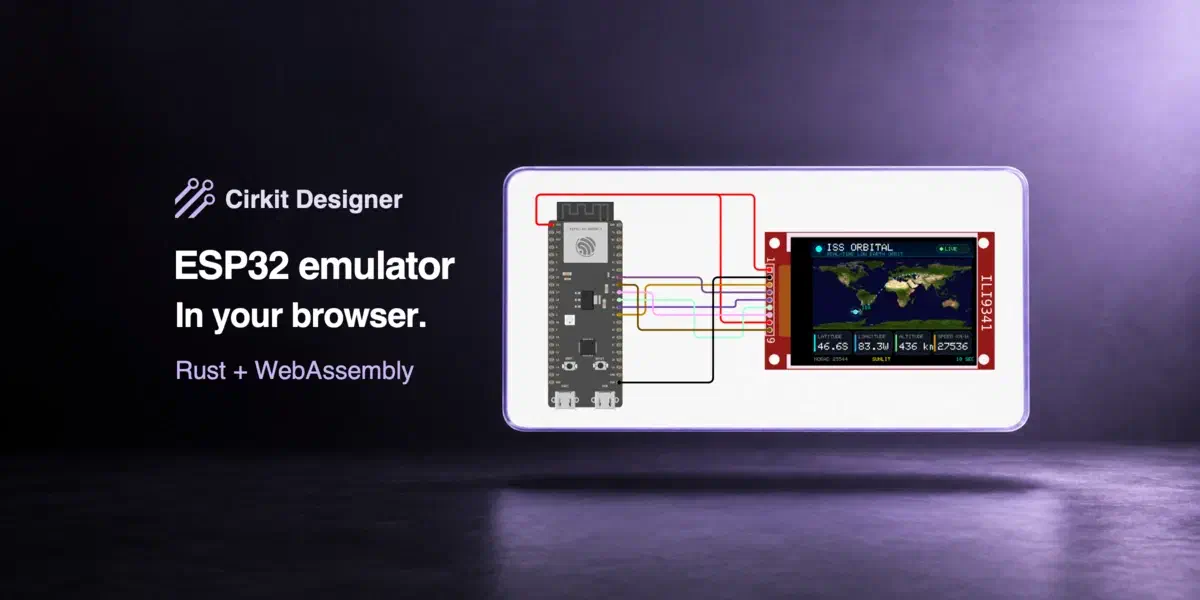

Cirkit Designer is a browser-based electronics development environment for designing circuits, writing firmware, and testing embedded projects in simulation. It supports both the original ESP32 and ESP32-S3, running compiled firmware locally in the browser through an instruction-accurate emulator built in Rust and compiled to WebAssembly.
The emulator executes Xtensa instructions for the selected chip and reproduces the hardware behavior needed to boot firmware and connect it to components on the circuit canvas. Running firmware can communicate with simulated displays, sensors, buttons, and other devices through supported interfaces such as GPIO, UART, I2C, SPI, ADC, and PWM. Firmware execution and communication with simulated components happen locally, without requiring a physical board.
Our approach focuses on hardware-level emulation rather than replacing firmware API calls with mocked results. Compiled firmware and its drivers interact with modeled peripheral registers, interrupts, and data transfers.
Cirkit also includes an AI agent that operates directly within the development environment to take a project from an initial prompt toward a working circuit. The agent can design and wire the circuit, write and modify firmware, and help diagnose and resolve problems—all within the same workspace where the project runs in simulation.
If a project requires a component that is not yet supported in simulation, the agent can also create the missing simulation model and integrate it into the circuit. This brings circuit design, firmware development, and simulator extension into the same workflow.
In the example below, I asked the agent to build an ESP32-S3 device that tracks the International Space Station. It created the circuit and firmware, connected the display, and produced a runnable project that retrieves live ISS position data over Wi-Fi and renders it on a simulated ILI9341 display.
Cirkit AI in action: tracking the International Space Station#
I started with a short request:
Build me an esp32 powered tracker of the ISS, use an ILI9341 for display and make it beautiful.
Cirkit AI created the circuit, wired the ESP32-S3 to the display, and wrote the firmware to fetch ISS data and display its position, altitude, and speed.
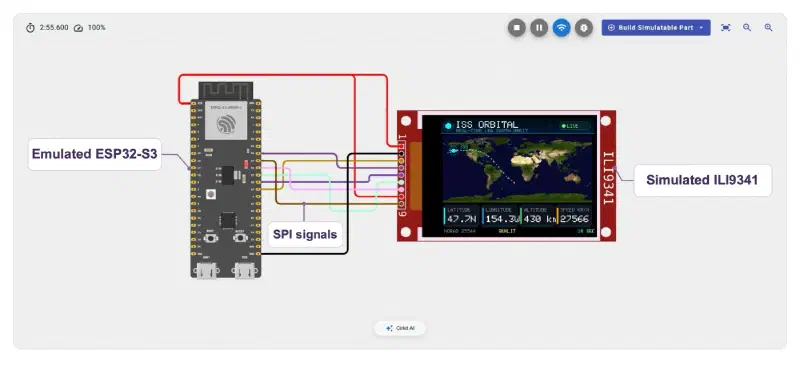
Open the ISS Space Tracker project in Cirkit Designer and start the simulation to see it running in real time.
With the tracker running, I worked with Cirkit AI to refine the display with a photographic Earth map, readable telemetry cards, and an animated ISS marker. I then asked it to show where the station was heading. The agent added a request for predicted positions covering the next 45 minutes and plotted them as a dashed line, alongside a blue trail of previously received positions. Updates redraw only the affected areas, keeping the map visible as the readings change.
The firmware uses WiFiClientSecure and HTTPClient to retrieve the station’s current and predicted positions from the Where the ISS at? API. It plots those coordinates on the display using Adafruit_GFX and Adafruit_ILI9341 through the ESP32-S3’s hardware SPI peripheral. A separately downloaded JPEG provides the Earth map, which the firmware decodes in memory and uses as the background.
To explore it, open the ISS Space Tracker in a desktop browser and start the simulation. After connecting to CirkitWifi, the firmware requests the latest position every ten seconds. The display shows the received coordinates and telemetry, while a trail records positions collected during the session. A LIVE badge identifies the live-data mode; if connectivity remains unavailable, a labeled DEMO mode provides an illustrative orbit.
Connecting simulated firmware to live services#
The tracker’s HTTPS requests pass through Cirkit’s network gateway to external services. The ESP32-S3 firmware processes the responses and drives the display locally in the browser. The same networking support extends to HTTP, MQTT, WebSocket, and UDP projects. Cirkit’s networking guide explains the setup.
Instruction-accurate ESP32 and ESP32-S3 simulation#
Running compiled firmware locally in the browser#
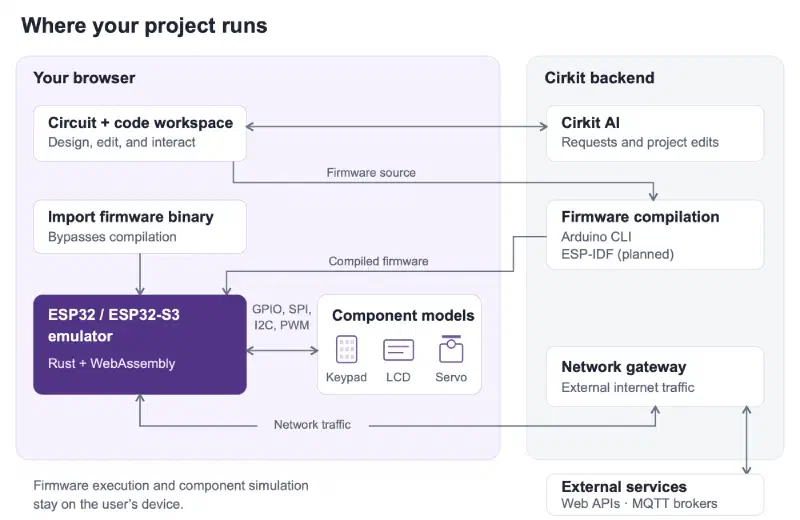
Cirkit’s integrated build workflow uses the Arduino CLI on its backend to compile your project’s code into firmware for the selected ESP32 or ESP32-S3 board. The Arduino core for ESP32 is built on ESP-IDF, so these projects already execute ESP-IDF code within the emulator. Support for building ESP-IDF projects directly in Cirkit is coming soon.
Users can also upload compatible precompiled firmware binaries directly into the simulator. In either case, the firmware runs unmodified in your browser, where Cirkit’s emulator executes the same Xtensa instructions that would run on the physical chip.
We built the emulator from scratch in Rust and compiled it to WebAssembly so it can run locally on your device. Getting unmodified firmware to run was one of the hardest engineering challenges. The emulator must execute Espressif’s ROM code, support the second-stage bootloader as it loads the application, and reproduce the hardware behavior needed to run FreeRTOS and your application. Each stage depends on correct processor state, memory access, and peripheral behavior—before your application can execute.
Once running, the firmware communicates with simulated components through the emulated hardware interfaces. It can read a sensor over I2C, send display commands over SPI, or control a servo through PWM. The component models respond to those operations, producing the behavior you see in the circuit.
Both chip models support GPIO, UART, I2C, SPI, ADC, timers, LEDC PWM, and RMT transmission for NeoPixels. Peripheral capabilities and pin assignments differ between the two chips. For the board used in this example, Cirkit’s ESP32-S3 documentation lists supported features and practical constraints.
Why we built it to run locally#
We wanted circuit interactions to feel responsive, without the network latency of sending inputs to a server and waiting for simulation results to return.
One option was to run QEMU, an open-source emulator that models processors, memory, and hardware devices, on Cirkit’s servers. It could execute the firmware, but connecting it to the browser would introduce network latency: a button press would travel to the server, and the resulting display update would travel back. The circuit’s responsiveness would depend on the user’s connection.
With Cirkit’s emulator, the firmware and simulated components run together in the browser. Button presses, sensor readings, and display updates are handled on the user’s device, without that server round trip.
This architecture also makes simulation easier to scale. Each user’s device supplies the processing power for its running project, removing the need for server-side CPU emulation for every session. That helps us offer ESP32 simulation for free.
Building the emulator took our small team roughly eight months, including ROM compatibility, Xtensa register-window behavior, and performance optimization. Our engineering overview describes that work.
Arduino CLI compilation, AI requests, and access to external internet services still use Cirkit’s backend. Firmware execution and communication with simulated components happen locally.
Add missing simulation components with Cirkit AI#
If your project needs a component that Cirkit doesn’t yet simulate, you can ask Cirkit AI to build it.
Cirkit AI creates the component’s simulation model, including its behavior, communication protocol, and interactive visuals. You can then connect it to your circuit, run firmware against it, and work with the agent to refine how it behaves. The component can be reused across projects.
The same AI that builds your project can also extend the simulator to support it. Cirkit’s component-building guide shows how.
Building an I2C LCD simulation component#
Our 16×2 I2C LCD tutorial demonstrates this capability with a display model built by Cirkit AI that receives I2C commands from firmware and renders the corresponding characters. The implementation connects three layers:
| Layer | What the model implements |
|---|---|
| Communication | Receives I2C writes at 0x27 and decodes the LCD backpack’s commands and data |
| Display state | Maintains character memory and the cursor position |
| Rendering | Converts stored characters into pixels in the component’s display area |
A test sketch sends Hello World to the LCD over I2C. In the tutorial, the user then directs Cirkit AI to refine character spacing and add missing numerals, developing the model against a running firmware example. The tutorial includes the implementation for readers to inspect and adapt.
Building the project and extending its simulation support become part of the same development workflow.
What comes next#
With ESP32 and ESP32-S3 simulation available, support for ESP32-C3 and ESP32-C6 is coming soon. We are also working to bring simulation feedback directly into Cirkit AI’s development loop, allowing the agent to run firmware, observe how a project behaves, identify problems, and iteratively refine the circuit and firmware.
Looking further ahead, our ambition is to help developers move from an initial idea to a working physical prototype—connecting circuit design and simulation with component sourcing, hardware assembly, and testing on real devices.