
Assignment 5: Hand gesture recognition with ESP-DL#
In the previous assignments you used ESP-WHO for face detection and recognition, and explored the camera pipeline hands-on in Assignment 4. In this assignment you will work with ESP-DL directly, without the ESP-WHO framework, to understand how to use a model as a standalone component in your own application.
The model you will use is a hand gesture classifier that recognises 10 distinct hand gestures. Rather than reading from the live camera, this example embeds a test JPEG image directly in flash and runs inference on it once at startup. This keeps the setup simple and lets you focus entirely on the inference pipeline itself.
Running inference on a static image is a deliberate simplification for learning purposes. In a real application, you would replace the embedded JPEG with a frame captured from the OV2640 camera. The dl::image::img_t tensor that the model receives is camera-agnostic — it only requires raw pixel data in RGB888 format and the image dimensions. Any source that can produce an img_t, whether a JPEG decoded from flash, a frame captured via the ESP-WHO pipeline, or a raw buffer from the camera driver, can be passed directly into HandGestureRecognizer::recognize().
The two-stage hand gesture pipeline#
Like face recognition, hand gesture recognition uses two models in sequence:
- Hand detection (
HandDetect) — finds the hand in the image and returns a bounding box. This uses a lightweight detection model similar in design to the face detector from Assignment 3. - Hand gesture classification (
HandGestureCls) — takes the detected hand region, resizes it to 128×128, and classifies it into one of 10 gesture categories.
graph LR
    A[Input image\nJPEG] --> B[sw_decode_jpeg\nRGB888]
    B --> C[HandDetect\nBounding box]
    C --> D[HandGestureCls\nMobileNetV2-0.5\n128×128]
    D --> E[Result\ncategory +\nscore]
Supported gestures#
The model was trained on gestures selected from the HaGRID dataset and recognises 10 categories: “one”, “two”, “three”, “four”, “five”, “like”, “ok”, “no_gesture”, “call”, and “dislike”. The class no_gesture represents a natural hand state or any hand gesture that does not belong to the 9 predefined gestures.
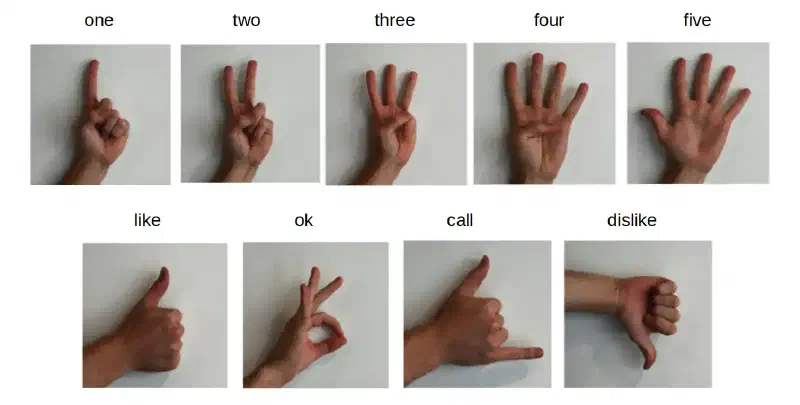
no_gesture, covers natural hand positions or any unlisted gesture.The classification model#
The gesture classifier uses a MobileNetV2-0.5 backbone — a lightweight convolutional neural network designed for mobile and embedded inference. The 0.5 refers to the width multiplier, which halves the number of channels throughout the network compared to the full MobileNetV2. This significantly reduces the model size and computation while retaining reasonable accuracy for a constrained set of gesture classes.
| Model | Input | Latency on ESP32-S3 | Latency on ESP32-P4 |
|---|---|---|---|
MOBILENETV2_0_5_S8_V1 | 128×128×3 | ~118 ms | ~28 ms |
The model uses 8-bit quantization and is stored in flash. The total flash usage for both the detection and classification models together is around 1.5 MB.
Step 1: Create the project#
Unlike the previous assignments that used examples from the ESP-WHO repository, this example comes directly from ESP-DL. Use the ESP-IDF Component manager to create a new project from the example in one command:
idf.py create-project-from-example "espressif/esp-dl=3.3.8:hand_gesture_recognition"ESP-DL v3.3.8 is the version against which this workshop was validated. You can omit the version pin ("espressif/esp-dl:hand_gesture_recognition") to get the latest release, but API details may differ slightly from what is shown here.
This downloads the example from the ESP Component Registry, creates a new directory named hand_gesture_recognition, and sets up the idf_component.yml with the correct dependencies automatically.
Navigate into the new project:
cd hand_gesture_recognitionOpen main/idf_component.yml and note the dependencies:
dependencies:
  espressif/hand_gesture_recognition:
    version: "*"
  espressif/esp32_s3_eye_noglib:
    version: "*"
    rules:
      - if: "target == esp32s3"
The hand_gesture_recognition component brings in both the hand detection model and the gesture classification model. The esp32_s3_eye_noglib component is the BSP without LVGL — it is only needed here to provide BSP SD card functions if you choose to load the model from an SD card. For this assignment, models are stored in flash rodata, so the BSP dependency is used conditionally.
Step 2: Build and flash#
Set the target and build:
idf.py set-target esp32s3
idf.py build flash monitor
When the example runs, it decodes the embedded JPEG, detects the hand, classifies the gesture, and prints the result before returning from app_main:
I (1784) hand_gesture_recognition: category: one, score: 0.999960
I (1784) main_task: Returned from app_main()
The default bundled image shows a single raised index finger, so the expected output is one with a very high confidence score.
Step 3: Understand the code#
Open main/app_main.cpp:
// 1. Load the embedded JPEG from flash
extern const uint8_t gesture_jpg_start[] asm("_binary_gesture_jpg_start");
extern const uint8_t gesture_jpg_end[]   asm("_binary_gesture_jpg_end");

dl::image::jpeg_img_t gesture_jpeg = {
    .data     = (void *)gesture_jpg_start,
    .data_len = (size_t)(gesture_jpg_end - gesture_jpg_start)
};

// 2. Decode JPEG to RGB888 tensor
auto gesture = dl::image::sw_decode_jpeg(gesture_jpeg, dl::image::DL_IMAGE_PIX_TYPE_RGB888);

// 3. Run the two-stage pipeline
HandDetect *hand_detect = new HandDetect();
auto hand_gesture_recognizer = new HandGestureRecognizer(HandGestureCls::MOBILENETV2_0_5_S8_V1);
std::vector<dl::cls::result_t> results = hand_gesture_recognizer->recognize(gesture, hand_detect->run(gesture));

// 4. Print results
for (const auto &res : results) {
    ESP_LOGI(TAG, "category: %s, score: %f", res.cat_name, res.score);
}
Understanding the score#
The score field in dl::cls::result_t is the softmax probability for the predicted class, expressed as a float between 0.0 and 1.0.
The MobileNetV2 classifier produces a raw output vector (logits) with one value per class — 10 values in this case. The softmax function converts those logits into a probability distribution: all 10 values become positive and sum to exactly 1.0. The class with the highest probability is returned as the result, and its probability is the score.
This means:
| Score range | Interpretation |
|---|---|
| 0.90 – 1.00 | Very high confidence. The image closely matches a single class. |
| 0.70 – 0.90 | Good confidence. The gesture is recognised but there is some ambiguity. |
| 0.50 – 0.70 | Low confidence. The model is uncertain, possibly due to lighting, angle, or partial occlusion. |
| Below 0.50 | Very low confidence. The gesture may not be in the training set, or the hand was not detected correctly. |
A score of 1.0 does not mean the model is infallible — it means the model has assigned almost all probability mass to one class. A well-lit, centred, clear gesture against a plain background will consistently score above 0.90. Poor lighting, motion blur, an unusual hand angle, or background clutter will all push the score down and increase the chance of misclassification.
The no_gesture class acts as a catch-all. When the model is uncertain and none of the 9 named gestures dominate, probability is spread across all classes and no_gesture may win by a small margin, often with a score below 0.60.
The image embedding works through CMake. Open main/CMakeLists.txt:
file(GLOB embed_files "${PROJECT_DIR}/gestures/*.jpg")
idf_component_register(... EMBED_FILES ${embed_files})
Every *.jpg file placed in the gestures/ folder is automatically embedded in flash as a binary symbol. The symbol name is derived from the filename: gestures/gesture.jpg becomes _binary_gesture_jpg_start / _binary_gesture_jpg_end.
Exercise: Test different hand gestures#
The default test image shows the one gesture. In this exercise you will replace it with images of other gestures and observe how the model responds.
Prepare your test images#
Take photos of your own hand in different gesture positions, or find reference images. Each image should:
- Show a single hand clearly against a plain background
- Be in JPEG format
- Be at least 128×128 pixels (larger is fine — the model resizes internally)
- Have good, even lighting and no motion blur
Name your images gesture.jpg (to replace the default) or use a new name like gesture_two.jpg, gesture_like.jpg, etc.
Replace the default image#
Copy your image into the gestures/ folder inside the project, replacing the existing gesture.jpg:
cp /path/to/your/image.jpg hand_gesture_recognition/gestures/gesture.jpgRebuild and flash:
idf.py build flash monitorObserve the output. Try the following gestures in sequence, replacing and reflashing for each:
| Your gesture | Expected label | Notes |
|---|---|---|
| Index finger pointing up | one | Keep other fingers folded |
| V sign (index + middle) | two | Clear separation between the two fingers |
| Three fingers extended | three | Index, middle, and ring fingers up |
| Four fingers extended | four | All fingers except thumb |
| Open hand | five | Spread all five fingers wide |
| Thumbs up | like | Keep the thumb clearly visible |
| Thumbs down | dislike | Point the thumb downward |
| OK sign | ok | Form a clear circle with thumb and index |
| Shaka (thumb + pinky) | call | Fold the three middle fingers |
| Fist or random pose | no_gesture | Any pose outside the 9 named classes |
Test with multiple images in one flash#
Instead of reflashing for each gesture, you can add multiple images to the gestures/ folder and modify app_main.cpp to iterate over them. Add a second image named gesture2.jpg to the folder, then update app_main.cpp:
// Add this alongside the existing gesture declarations
extern const uint8_t gesture2_jpg_start[] asm("_binary_gesture2_jpg_start");
extern const uint8_t gesture2_jpg_end[]   asm("_binary_gesture2_jpg_end");

// After the first inference, run a second one
dl::image::jpeg_img_t gesture2_jpeg = {
    .data     = (void *)gesture2_jpg_start,
    .data_len = (size_t)(gesture2_jpg_end - gesture2_jpg_start)
};
auto gesture2 = dl::image::sw_decode_jpeg(gesture2_jpeg, dl::image::DL_IMAGE_PIX_TYPE_RGB888);
std::vector<dl::cls::result_t> results2 = hand_gesture_recognizer->recognize(gesture2, hand_detect->run(gesture2));
for (const auto &res : results2) {
    ESP_LOGI(TAG, "gesture2 -> category: %s, score: %f", res.cat_name, res.score);
}
heap_caps_free(gesture2.data);
Rebuild, flash, and you should see results for both images in the serial monitor.
Each embedded JPEG takes up flash space equal to its file size. Keep images under 200 KB each to avoid running out of flash. You can check flash usage in the build output under idf.py size.
Questions to consider#
- How does the confidence score change when you rotate the hand slightly or change the background?
- What score does the model give for
no_gesturewhen you show a fist or a gesture it was not trained on?
What you learned#
In this assignment you:
- Used ESP-DL directly as a component, without the ESP-WHO framework, to run a complete two-stage inference pipeline
- Learned how JPEG images can be embedded in flash and decoded at runtime using
sw_decode_jpeg - Tested the
HandGestureClsMobileNetV2-0.5 classifier against different hand gesture images and observed confidence scores - Understood how the CMake
EMBED_FILESmechanism links binary data directly into the firmware image