
In this assignment, you will analyze the binary image size and optimize the memory footprint of your application.
Assignment steps#
- Build the original project to spot any oversized sections (e.g., .text, .data, .rodata) that may hide unoptimized code.
- Change configuration to reduce size.
Build the original project to spot any oversized sections#
- Reopen the last assignment code (it can be both 2.1 or 2.2)
> ESP-IDF: Full Clean Project> ESP-IDF: Build Your Project
You will get the summary table of Fig.1 for the binary image.
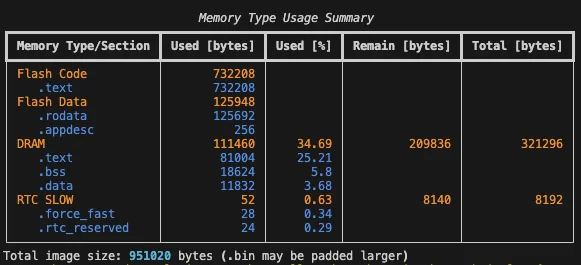
Fig.1 - Size calculation
Change the configuration to reduce size#
Removing the logs#
- Remove the logging output in the
menuconfig
if you don’t remember how to do that, check assignment 1.3 > ESP-IDF: Build Your Project
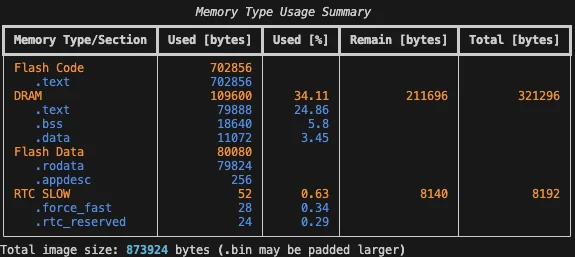
Fig.2 - Size calculation after removing logging
After building the firmware, we see that the binary size is 77kb less than before.
Certificate Bundle#
- Open menuconfig:
> ESP-IDF: SDK Configuration Editor (menuconfig) - Uncheck
Certificate Bundle→Enable trusted root certificate bundle > ESP-IDF: Build Your Project
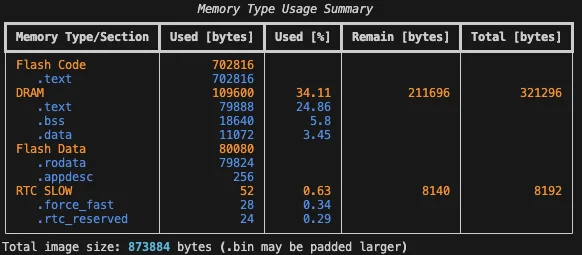
Fig.3 - Size calculation after removing certificate bundle
MQTT unused options#
- Open menuconfig:
> ESP-IDF: SDK Configuration Editor (menuconfig) - Uncheck
ESP-MQTT Configurations→Enable MQTT over SSL - Uncheck
ESP-MQTT Configurations→Enable MQTT over Websocket > ESP-IDF: Build Your Project
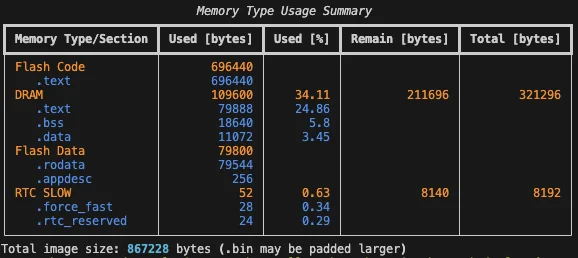
Fig.4 - Size calculation after removing mqtt ssl and websocket support
We gained another 6.7kb.
Conclusion#
In this assignment, we saw how to check the size of our binary and how to use the menuconfig to removed unused options to improve the memory footprint of our application.
Next step: Assignment 3.2