
Introduction#
As IoT devices become more widespread in homes, industries, and critical infrastructure, the need for robust security is growing rapidly. These connected systems often handle personal data, control physical processes, and operate in untrusted environments, making them attractive targets for attackers.
In response to these risks, new regulations like the EU’s Radio Equipment Directive Delegated Act (RED DA) are raising the bar for IoT security, requiring manufacturers to implement stronger protections by design.
To meet these evolving demands, three core technologies have become staples of modern IoT security: over-the-air (OTA) updates, flash encryption, and secure bootloaders.
In this workshop section we will focus on the OTA.
Over-the-Air (OTA) updates on Espressif devices#
Over-the-Air (OTA) updates allow you to remotely upgrade the firmware of embedded devices without requiring physical access. This capability is especially important for IoT deployments, where devices are often distributed across wide or hard-to-reach areas. OTA ensures your devices stay up to date with the latest features, bug fixes, and security patches long after they’ve been deployed.
In the OTA process, the Espressif device downloads the firmware from a given location, as depicted in Fig.1.
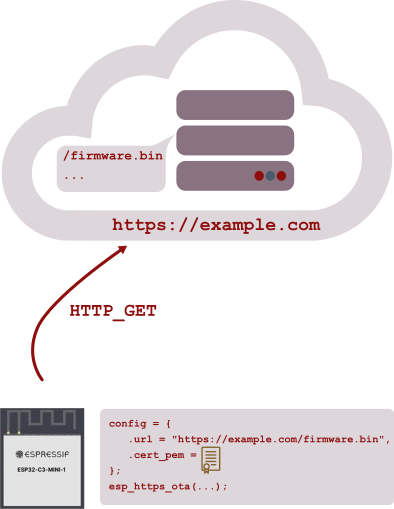
Fig.1 – OTA basic diagram
Key benefits of OTA include:
- Remote maintenance: Update firmware without on-site visits.
- Improved security: Quickly patch known vulnerabilities.
- Feature updates: Seamlessly deliver new functionality to users.
- Lower maintenance costs: Avoid expensive manual recalls or servicing.
Implementing OTA with ESP-IDF#
ESP-IDF offers built-in support for OTA through two main methods:
- Native API: Using the
app_updatecomponent for full control over the update process. - Simplified API: Using the
esp_https_otacomponent for a higher-level interface that handles HTTPS download and flashing automatically.
In most cases, application needs to interact with the public interfaces of esp_https_ota and app_update components only.
In Fig.2 you can find a simplified diagram of the OTA key components.
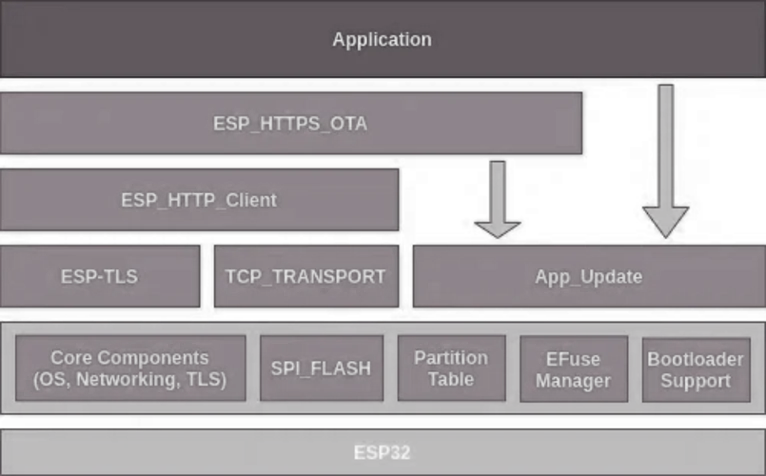
Fig.2 – OTA key components (simplified diagram)
A typical OTA workflow includes:
- Downloading the new firmware image over Wi-Fi or Ethernet.
- Writing it to an unused OTA partition in flash.
- Updating the
otadatapartition to mark the new firmware as the active version. - Rebooting the device to apply the update.
Example code snippet using esp_https_ota#
Using esp_https_ota is straightforward and typically requires just a few lines of code.
#include "esp_https_ota.h"

esp_err_t do_firmware_upgrade()
{
    esp_http_client_config_t config = {
        .url = "https://example.com/firmware.bin",
        .cert_pem = (char *)server_cert_pem_start,
    };
    esp_https_ota_config_t ota_config = {
        .http_config = &config,
    };
    esp_err_t ret = esp_https_ota(&ota_config);
    if (ret == ESP_OK) {
        esp_restart();
    } else {
        return ESP_FAIL;
    }
    return ESP_OK;
}
This code downloads a new firmware image and, if successful, restarts the device to boot into the new firmware. For more advanced usage, refer to the ESP-IDF OTA documentation.
OTA partition table layout#
OTA requires a specific partition table layout. At minimum, you need:
- NVS partition: For non-volatile storage.
otadatapartition: To track which firmware partition is active.- Two OTA app partitions: For active/passive firmware images.
An example of valid partition table is as follows:
Name,   Type, SubType, Offset,  Size, Flags
nvs,      data, nvs,     ,        0x6000,
otadata,  data, ota,     ,        0x2000,
phy_init, data, phy,     ,        0x1000,
ota_0,    app,  ota_0,   ,        1M,
ota_1,    app,  ota_1,   ,        1M,
This layout ensures safe updates: the new firmware is written to the inactive partition, and only after verification is it marked as active for the next boot. The OTA data partition is two flash sectors (0x2000 bytes) to prevent corruption in case of power failure during updates.
Besides the already mentioned (data,nvs), this partition table contains a (data,ota) field which plays an important role in OTA updates.
otadata partition#
The otadata partition is a special partition in the ESP-IDF partition table, required for projects that use Over-The-Air (OTA) firmware updates. Its main purpose is to store information about which OTA app slot (such as ota_0 or ota_1) should be booted by the device. It’s typical size is 0x2000 bytes (two flash sectors)
The otadata partition is used as follows:
- On first boot (or after erasing), the otadata partition is empty (all bytes set to
0xFF). In this state, the bootloader will boot the factory app if present. If not, it will boot the first OTA slot. - After a successful OTA update, the
otadatapartition is updated to indicate which OTA app slot should be booted next. - The partition is designed to be robust against power failures: it uses two sectors, and a counter field to determine the most recent valid data if the sectors disagree.
App rollback#
Downloading and flashing a new image does not guarantee that the new firmware will run correctly. If the updated application crashes or fails to connect, app rollback lets the device return to the previous working application automatically.
Rollback keeps the device operational after an update. When you enable it with the CONFIG_BOOTLOADER_APP_ROLLBACK_ENABLE option, a freshly updated application gets only one attempt to confirm that it works. On its first boot, the new app must confirm its own health, otherwise the bootloader reverts to the previous image on the next reboot.
This confirmation relies on the OTA state stored in the otadata partition. After a new image is set as bootable, it is marked as pending verification. The running application then determines the outcome:
- If a self-test passes, the app calls
esp_ota_mark_app_valid_cancel_rollback()to mark itself as valid. There are no further restrictions on booting it. - If a self-test fails, the app calls
esp_ota_mark_app_invalid_rollback_and_reboot()to mark itself as invalid and reboot, so the bootloader loads the previous working application. - If the app never confirms itself (for example, due to a crash or power loss), the bootloader detects the unconfirmed state on the next boot and rolls back automatically.
Only ota partitions can be rolled back. A factory partition is never rolled back.
The following snippet shows the typical pattern: on the first boot after an update, the application checks whether it is pending verification, runs a diagnostic, and then either confirms itself or triggers a rollback.
#include "esp_ota_ops.h"

const esp_partition_t *running = esp_ota_get_running_partition();
esp_ota_img_states_t ota_state;
if (esp_ota_get_state_partition(running, &ota_state) == ESP_OK) {
    if (ota_state == ESP_OTA_IMG_PENDING_VERIFY) {
        // Run your application self-test here
        bool diagnostic_is_ok = diagnostic();
        if (diagnostic_is_ok) {
            ESP_LOGI(TAG, "Diagnostics passed, confirming new firmware");
            esp_ota_mark_app_valid_cancel_rollback();
        } else {
            ESP_LOGE(TAG, "Diagnostics failed, rolling back to previous version");
            esp_ota_mark_app_invalid_rollback_and_reboot();
        }
    }
}
Rollback builds on the esp_https_ota and app_update components covered earlier. The update flow downloads and flashes the image as before, and rollback adds a verification step that prevents the device from being left running a broken application.
Conclusion#
OTA updates give you a reliable way to keep Espressif devices secure and up to date after deployment. By combining the esp_https_ota or app_update components with a correctly configured partition table, your application can download new firmware, verify it, and switch to it safely, even if power is lost mid-update. With app rollback enabled, a faulty update can even undo itself, returning the device to the last known-good firmware without any manual intervention.
Next Step#
Next assignment → assignment 3.1