
Assignment 2: Protect data with HMAC-based NVS encryption#
In Assignment 1 you ran https_mbedtls with the certificate bundle and Wi-Fi from menuconfig. Here you keep that TLS client code and add HMAC-based NVS encryption on the default nvs partition, so the lab Wi-Fi SSID and password live in encrypted NVS instead of only in the compiled CONFIG_EXAMPLE_WIFI_* strings.
The NVS configuration follows the ESP-IDF example nvs_encryption_hmac: the HMAC key lives in an eFuse key block, and nvs_flash_init() derives the XTS keys from it at runtime. Read Lecture 2 for the threat model, the first-boot behavior, and how this differs from flash encryption.
From this assignment on, you run the firmware in the ESP32 emulator instead of on your board. The firmware burns a real HMAC key on its first boot, and the emulator burns it into its own eFuses, so your board stays untouched.
Before you begin#
Prepared project (recommended): use the complete Assignment 2 project from the workshop project setup. From the code-examples directory, run cd assignment-2. The steps below explain the supplied partition table, source, configuration, and verification flow.
For the manual cumulative route, continue in your completed Assignment 1 project and apply each change below. Do not run set-target again in that same project because it resets sdkconfig.
Do not flash this firmware to your board. On first boot it permanently burns an HMAC key into eFuse block BLOCK_KEY0. Run it only in the emulator. See Lab safety and the ESP32 emulator.
Disconnect the board now: unplug the USB cable from your computer before you continue. A flash command run by mistake then has no device to write to, and your board stays untouched. Keep it unplugged for Assignments 2 to 5.
Emulator Wi-Fi: the emulator provides an access point with SSID myssid and password mypassword. You set these in Step 2. The emulator in the browser has no internet access, so the TLS request at the end of the log fails; that is expected.
Never commit Wi-Fi passwords or key files.
Step 1: Set the flash size and partition table#
Goal: use the partition layout that all the remaining assignments share.
The table below reserves room for everything the later labs add: a larger bootloader for Secure Boot and flash encryption, an encrypted storage partition, an nvs_keys partition, and two OTA slots. Setting it up now means you never move a partition again.
Create
partitions.csvin the project root (next toCMakeLists.txt):# Name, Type, SubType, Offset, Size, Flags nvs, data, nvs, 0x11000, 0x6000, otadata, data, ota, 0x17000, 0x2000, phy_init, data, phy, 0x19000, 0x1000, storage, data, 0xff, 0x1A000, 0x1000, encrypted nvs_keys, data, nvs_keys, 0x1B000, 0x1000, encrypted ota_0, app, ota_0, 0x20000, 0x1C0000, ota_1, app, ota_1, 0x1E0000, 0x1C0000,Open the project configuration with
idf.py menuconfig. Keep Serial flasher config → Flash size at 4 MB. Under Partition Table, select Custom partition table CSV, set the filename topartitions.csv, and set the partition table offset to0x10000.In
sdkconfig.defaults, replaceCONFIG_PARTITION_TABLE_SINGLE_APP_LARGE=yfrom Assignment 1 with the custom partition settings below. Keep the 4 MB flash setting:CONFIG_ESPTOOLPY_FLASHSIZE_4MB=y CONFIG_PARTITION_TABLE_CUSTOM=y CONFIG_PARTITION_TABLE_CUSTOM_FILENAME="partitions.csv" CONFIG_PARTITION_TABLE_OFFSET=0x10000
How the layout fits together:
- The bootloader starts at
0x2000. Moving the partition table to0x10000leaves up to0xE000bytes for it, including room for the security features enabled in later assignments. storageandnvs_keysare markedencrypted. They take effect in Assignment 4; until flash encryption is on, the flag has no effect.- There is no
factorypartition. With an emptyotadata, the bootloader starts the app fromota_0. - The emulator flash is 4 MB, so the project uses 4 MB even though the module on your board has more.
Step 2: Enable HMAC-based NVS encryption#
Goal: register the HMAC NVS security provider, encrypt the default nvs partition, and set the emulator Wi-Fi credentials (see HMAC scheme in ESP-IDF).
Open the project configuration:
idf.py menuconfigOpen View → Tool Windows → Terminal and run:
idf.py menuconfigThen:
- Open Component config → NVS and enable Enable NVS encryption (CONFIG_NVS_ENCRYPTION).
- Open Component config → NVS Security Provider (visible only after the previous step).
- Confirm NVS Encryption: Key Protection Scheme is Using HMAC peripheral (CONFIG_NVS_SEC_KEY_PROTECT_USING_HMAC). This is the default on the ESP32-S31.
- Set eFuse key ID storing the HMAC key to
0(CONFIG_NVS_SEC_HMAC_EFUSE_KEY_ID). - Open Example Connection Configuration and set WiFi SSID to
myssidand WiFi Password tomypassword.
Add the same settings to sdkconfig.defaults so the configuration survives a clean rebuild:
CONFIG_NVS_ENCRYPTION=y
CONFIG_NVS_SEC_KEY_PROTECT_USING_HMAC=y
CONFIG_NVS_SEC_HMAC_EFUSE_KEY_ID=0
CONFIG_EXAMPLE_WIFI_SSID="myssid"
CONFIG_EXAMPLE_WIFI_PASSWORD="mypassword"
These are the emulator’s public test credentials. Never put real Wi-Fi credentials in sdkconfig.defaults.
You do not need the custom_nvs partition from the standalone example; the default nvs partition is enough for Wi-Fi credentials. If the build stops with Configured eFuse block (CONFIG_NVS_SEC_HMAC_EFUSE_KEY_ID) out of range!, the key ID is still -1.
Step 3: Add Wi-Fi credential helpers#
Goal: write SSID and password into namespace workshop_wifi on the encrypted default NVS partition, then load them for connection.
- In
main/, add four files:wifi_creds.h,wifi_creds.c,workshop_wifi_connect.h, andworkshop_wifi_connect.c. - Register the new sources in
main/CMakeLists.txt, keepinghttps_mbedtls_example_main.cand the upstream dependencies, and addesp_wifi,efuse, andesp_partition:
idf_component_register(SRCS "https_mbedtls_example_main.c" "wifi_creds.c" "workshop_wifi_connect.c"
                    PRIV_REQUIRES esp_event nvs_flash esp_netif esp_wifi mbedtls efuse esp_partition
INCLUDE_DIRS ".")- Implement provisioning and load (lab: one-time copy from menuconfig on first boot; shipping firmware would use a provisioning flow or factory tools instead):
wifi_creds.h
#pragma once

#include "esp_err.h"
#include "esp_wifi.h"

#ifdef __cplusplus
extern "C" {
#endif

esp_err_t wifi_creds_provision_from_menuconfig_if_missing(void);
esp_err_t wifi_creds_load(wifi_config_t *cfg);

#ifdef __cplusplus
}
#endif
wifi_creds.c
#include "wifi_creds.h"

#include <string.h>

#include "nvs.h"
#include "nvs_flash.h"
#include "esp_log.h"
#include "sdkconfig.h"

static const char *TAG = "wifi_creds";
static const char *NS = "workshop_wifi";
static const char *KEY_SSID = "ssid";
static const char *KEY_PASS = "pass";

esp_err_t wifi_creds_provision_from_menuconfig_if_missing(void)
{
    nvs_handle_t h;
    esp_err_t err = nvs_open(NS, NVS_READONLY, &h);
    if (err == ESP_OK) {
        size_t len = 0;
        err = nvs_get_str(h, KEY_SSID, NULL, &len);
        nvs_close(h);
        if (err == ESP_OK && len > 1) {
            ESP_LOGI(TAG, "Wi-Fi credentials already in NVS");
            return ESP_OK;
        }
    }

    err = nvs_open(NS, NVS_READWRITE, &h);
    if (err != ESP_OK) {
        return err;
    }
#if CONFIG_EXAMPLE_CONNECT_WIFI
    err = nvs_set_str(h, KEY_SSID, CONFIG_EXAMPLE_WIFI_SSID);
    if (err == ESP_OK) {
        err = nvs_set_str(h, KEY_PASS, CONFIG_EXAMPLE_WIFI_PASSWORD);
    }
    if (err == ESP_OK) {
        err = nvs_commit(h);
    }
    nvs_close(h);
    if (err == ESP_OK) {
        ESP_LOGI(TAG, "Stored lab Wi-Fi credentials in NVS");
    }
    return err;
#else
    nvs_close(h);
    return ESP_ERR_NOT_SUPPORTED;
#endif
}

esp_err_t wifi_creds_load(wifi_config_t *cfg)
{
    memset(cfg, 0, sizeof(*cfg));
    nvs_handle_t h;
    esp_err_t err = nvs_open(NS, NVS_READONLY, &h);
    if (err != ESP_OK) {
        return err;
    }

    size_t ssid_len = sizeof(cfg->sta.ssid);
    size_t pass_len = sizeof(cfg->sta.password);
    err = nvs_get_str(h, KEY_SSID, (char *)cfg->sta.ssid, &ssid_len);
    if (err == ESP_OK) {
        err = nvs_get_str(h, KEY_PASS, (char *)cfg->sta.password, &pass_len);
    }
    nvs_close(h);

    if (err == ESP_OK) {
        ESP_LOGI(TAG, "Loaded Wi-Fi SSID from NVS: %s", cfg->sta.ssid);
    }
    return err;
}- Add a small STA connect helper. It uses the same netif and Wi-Fi init pattern as
example_connect(), butwifi_config_tcomes fromwifi_creds_load():
workshop_wifi_connect.h
#pragma once

#include "esp_err.h"

#ifdef __cplusplus
extern "C" {
#endif

esp_err_t workshop_wifi_connect(void);

#ifdef __cplusplus
}
#endif
workshop_wifi_connect.c (minimal; mirror scan and auth threshold options from the protocol examples Wi-Fi connect if your AP needs them):
#include "workshop_wifi_connect.h"
#include "wifi_creds.h"

#include "esp_check.h"
#include "esp_event.h"
#include "esp_log.h"
#include "esp_netif.h"
#include "esp_wifi.h"
#include "freertos/FreeRTOS.h"
#include "freertos/event_groups.h"

#define WIFI_CONNECTED_BIT BIT0
#define WIFI_FAIL_BIT      BIT1
#define WIFI_MAX_RETRY     5

static const char *TAG = "workshop_wifi";
static EventGroupHandle_t s_wifi_event_group;
static int s_retry_count;

static void on_wifi_event(void *arg, esp_event_base_t base, int32_t id, void *data)
{
    if (id == WIFI_EVENT_STA_START) {
        esp_wifi_connect();
    } else if (id == WIFI_EVENT_STA_DISCONNECTED) {
        if (s_retry_count < WIFI_MAX_RETRY) {
            s_retry_count++;
            ESP_LOGW(TAG, "Disconnected, retry %d/%d", s_retry_count, WIFI_MAX_RETRY);
            esp_wifi_connect();
        } else {
            xEventGroupSetBits(s_wifi_event_group, WIFI_FAIL_BIT);
        }
    }
}

static void on_got_ip(void *arg, esp_event_base_t base, int32_t id, void *data)
{
    s_retry_count = 0;
    xEventGroupSetBits(s_wifi_event_group, WIFI_CONNECTED_BIT);
}

esp_err_t workshop_wifi_connect(void)
{
    wifi_config_t cfg;
    ESP_RETURN_ON_ERROR(wifi_creds_load(&cfg), TAG, "load creds");

    s_wifi_event_group = xEventGroupCreate();
    esp_netif_create_default_wifi_sta();
    wifi_init_config_t wcfg = WIFI_INIT_CONFIG_DEFAULT();
    ESP_ERROR_CHECK(esp_wifi_init(&wcfg));
    ESP_ERROR_CHECK(esp_event_handler_register(WIFI_EVENT, ESP_EVENT_ANY_ID, &on_wifi_event, NULL));
    ESP_ERROR_CHECK(esp_event_handler_register(IP_EVENT, IP_EVENT_STA_GOT_IP, &on_got_ip, NULL));
    ESP_ERROR_CHECK(esp_wifi_set_storage(WIFI_STORAGE_RAM));
    ESP_ERROR_CHECK(esp_wifi_set_mode(WIFI_MODE_STA));
    ESP_ERROR_CHECK(esp_wifi_set_config(WIFI_IF_STA, &cfg));
    ESP_ERROR_CHECK(esp_wifi_start());

    EventBits_t bits = xEventGroupWaitBits(s_wifi_event_group, WIFI_CONNECTED_BIT | WIFI_FAIL_BIT,
                                           pdFALSE, pdFALSE, pdMS_TO_TICKS(30000));
    if ((bits & WIFI_CONNECTED_BIT) == 0) {
        ESP_LOGE(TAG, "Could not connect to SSID %s", cfg.sta.ssid);
        return ESP_ERR_TIMEOUT;
    }
    ESP_LOGI(TAG, "Connected using credentials from NVS");
    return ESP_OK;
}
WIFI_STORAGE_RAM stops the Wi-Fi driver from keeping its own copy of the credentials in NVS, so workshop_wifi is the only place they are stored.
Step 4: Wire app_main and add evidence helpers#
Goal: initialize encrypted NVS before any credential access, keep https_get_task unchanged from Assignment 1, and log the evidence you will check in the emulator.
In https_mbedtls_example_main.c:
- Keep all mbedTLS client code and the certificate bundle setup in
https_get_task. - Replace
#include "protocol_examples_common.h"with the new headers, and add two helpers.log_security_state()reports which eFuse key block holds the HMAC key; you extend it in Assignments 3 and 4.dump_nvs_prefix()prints the start of the rawnvspartition, as the upstream example does withdump_custom_nvs_partition()(see Reference example architecture):
#include <stdlib.h>
#include "esp_efuse.h"
#include "esp_partition.h"
#include "wifi_creds.h"
#include "workshop_wifi_connect.h"

static void log_security_state(void)
{
    esp_efuse_block_t blk;

    if (esp_efuse_find_purpose(ESP_EFUSE_KEY_PURPOSE_HMAC_UP, &blk)) {
        ESP_LOGI(TAG, "HMAC_UP key in BLOCK_KEY%d", blk - EFUSE_BLK_KEY0);
    }
}

static void dump_nvs_prefix(size_t len)
{
    const esp_partition_t *part = esp_partition_find_first(
        ESP_PARTITION_TYPE_DATA, ESP_PARTITION_SUBTYPE_DATA_NVS, "nvs");
    if (!part) {
        return;
    }
    uint8_t *buf = calloc(1, len);
    if (!buf) {
        return;
    }
    ESP_ERROR_CHECK(esp_partition_read(part, 0, buf, len));
    ESP_LOG_BUFFER_HEXDUMP("nvs_raw", buf, len, ESP_LOG_INFO);
    free(buf);
}- Replace the
nvs_flash_init()/example_connect()block inapp_main:
void app_main(void)
{
    esp_err_t ret = nvs_flash_init();
    if (ret == ESP_ERR_NVS_NO_FREE_PAGES || ret == ESP_ERR_NVS_NEW_VERSION_FOUND) {
        ESP_ERROR_CHECK(nvs_flash_erase());
        ret = nvs_flash_init();
    }
    ESP_ERROR_CHECK(ret);

    log_security_state();

    ESP_ERROR_CHECK(wifi_creds_provision_from_menuconfig_if_missing());

    dump_nvs_prefix(512);

    ESP_ERROR_CHECK(esp_netif_init());
    ESP_ERROR_CHECK(esp_event_loop_create_default());

    ESP_ERROR_CHECK(workshop_wifi_connect());

    xTaskCreate(&https_get_task, "https_get_task", 8192, NULL, 5, NULL);
}- Leave Component config → mbedTLS → Certificate Bundle as in Assignment 1. Keep
protocol_examples_commonin the project:wifi_creds.cstill reads the lab SSID and password from its menuconfig options on first boot.
Step 5: Build the emulator image#
Goal: produce one file that contains the bootloader, partition table, OTA data, and app.
idf.py build
idf.py merge-bin
The image is build/merged-binary.bin.
- Select the generated
appconfiguration in the configuration switcher, then click Build (the hammer icon). - Open View → Tool Windows → Terminal and run:
idf.py merge-binThe image is build/merged-binary.bin.
Step 6: Run in the emulator#
Goal: watch the first boot generate and burn the HMAC key, and confirm that NVS is encrypted.
Open the ESP32 emulator in a new browser tab. The emulator runs entirely in your tab, and the firmware never leaves your machine. The page has these parts:
- The Target panel on the left selects the chip and the firmware image.
- The WiFi Soft AP panel shows the emulated access point,
myssidwith passwordmypassword. - The UART0 console in the middle shows the serial output, as
idf.py monitorwould. - The Run, Pause, and Reset buttons at the top control the emulated chip.
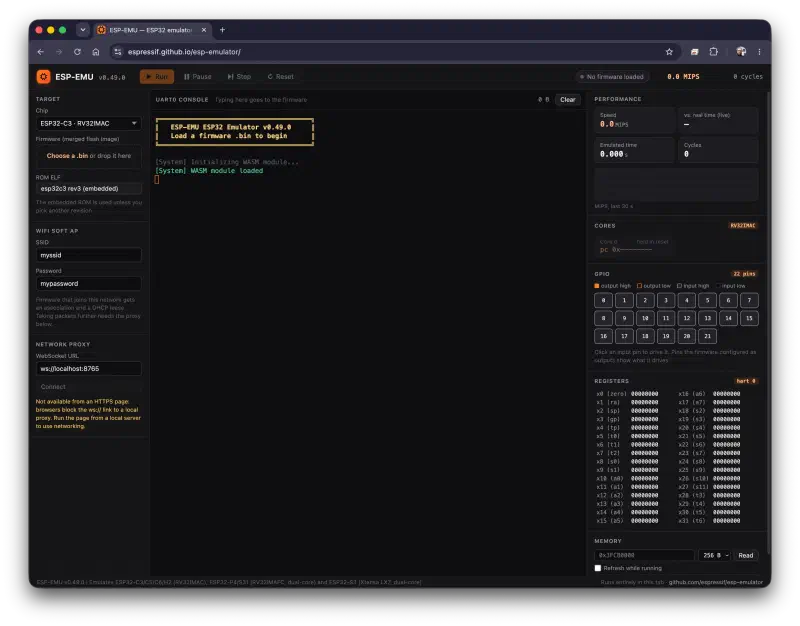
The ESP32 emulator, ready to load a firmware image Under Target → Chip, select ESP32-S31 · RV32IMAFC ×2. The default chip is ESP32-C3; an image built for
esp32s31does not run on it.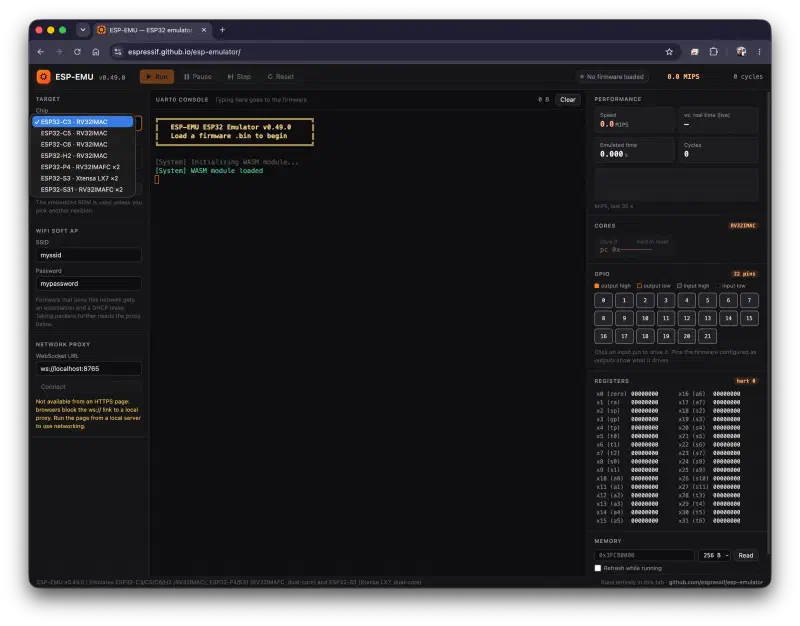
Selecting ESP32-S31 as the emulated chip Under Firmware (merged flash image), click Choose a .bin and select
build/merged-binary.bin, or drop the file on the field. Leave ROM ELF on the embedded ROM.Click Run and read the UART0 console. The status at the top right changes to Running.
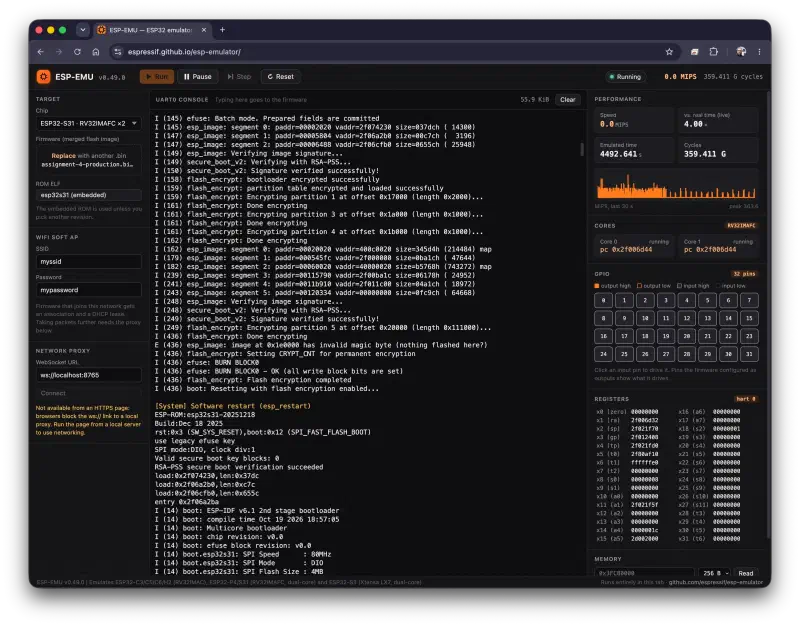
Firmware running on the emulated ESP32-S31. This example shows the flash encryption first boot from Assignment 4
You do not need the Network proxy panel: the emulated access point is enough for the firmware to join Wi-Fi and get an IP address.
First boot. The error and warning lines are expected: no key exists yet, so nvs_flash_init() generates one and burns it into BLOCK4, which is BLOCK_KEY0:
I (...) nvs_sec_provider: NVS Encryption - Registering HMAC-based scheme...
E (...) nvs_sec_provider: Could not find HMAC key in configured eFuse block!
W (...) nvs: Failed to read NVS security cfg: [0xF001] (ERROR)
I (...) nvs: Generating NVS encr-keys...
I (...) efuse: Batch mode of writing fields is enabled
I (...) efuse: BURN BLOCK4
I (...) efuse: BURN BLOCK4 - OK (write block == read block)
I (...) efuse: BURN BLOCK0
I (...) efuse: BURN BLOCK0 - OK (write block == read block)
I (...) efuse: BURN BLOCK0
I (...) efuse: BURN BLOCK0 - OK (all write block bits are set)
I (...) efuse: Batch mode. Prepared fields are committed
I (...) nvs: NVS partition "nvs" is encrypted.
I (...) example: HMAC_UP key in BLOCK_KEY0
I (...) wifi_creds: Stored lab Wi-Fi credentials in NVS
The first BURN BLOCK0 sets the key purpose to HMAC_UP; the second sets the read protection, so software can never read the key back.
Then the app connects to the emulator access point:
I (...) wifi_creds: Loaded Wi-Fi SSID from NVS: myssid
I (...) esp_netif_handlers: sta ip: 192.168.4.2, mask: 255.255.255.0, gw: 192.168.4.1
I (...) workshop_wifi: Connected using credentials from NVS
I (...) example: Connecting to www.howsmyssl.com:443...
E (...) example: mbedtls_net_connect returned -52
The last line is expected: the browser emulator has no internet access. TLS was verified on the board in Assignment 1, and https_get_task is unchanged.
- Second boot. Click Reset without loading a new image. eFuses and flash are kept across a reset within the same run. Expected:
- No
Generating NVS encr-keys...line: the HMAC key is already in eFuse, so the same XTS keys are derived. Wi-Fi credentials already in NVS, and the connection still works using NVS only.
- No
Loading an image again, or reloading the page, starts with a blank chip, so the next first boot generates a new key.
Success criteria (log text may vary slightly):
| Check | Expected |
|---|---|
| HMAC NVS scheme | NVS Encryption - Registering HMAC-based scheme... |
| HMAC key | First boot: Generating NVS encr-keys... and the BURN BLOCK4 lines. After a reset: no key messages |
| Key block | HMAC_UP key in BLOCK_KEY0 on every boot |
| Default NVS encrypted | NVS partition "nvs" is encrypted. on every boot |
| Credentials stored | Stored lab Wi-Fi credentials in NVS on first boot, then Wi-Fi credentials already in NVS |
| Wi-Fi from NVS | Loaded Wi-Fi SSID from NVS: myssid and Connected using credentials from NVS |
Step 7: Inspect raw NVS storage#
Goal: show that the password is not visible in a raw partition read.
- In the console, find the
nvs_rawhex dump that followsStored lab Wi-Fi credentials in NVS. - Search it for
mypasswordand for theworkshop_wifinamespace string. Neither should appear as readable ASCII. The first 32 bytes (page header) stay readable; that is expected. - The SSID and password may still appear inside the application image, because the menuconfig strings are compiled into the binary. Assignment 4 closes that gap with flash encryption. Record it in your notes.
Keep log excerpts for your CRA-oriented credentials at rest evidence (see CRA and product evidence). You can remove the dump_nvs_prefix() call afterwards, but keep it if you want to compare the dump in Assignments 3 and 4.
Step 8: Validation matrix#
Run these checks and record pass or fail in your workshop notes.
| Test | Action | Expected |
|---|---|---|
| Encrypted init | First boot in the emulator | Key generated once, nvs encrypted log line present |
| eFuse key | Same boot | BURN BLOCK4 lines and HMAC_UP key in BLOCK_KEY0 |
| Wi-Fi from NVS | Same boot | Connected using credentials from NVS |
| NVS persistence | Reset, no new image | No new key, Wi-Fi credentials already in NVS, connects from NVS |
| Dump | Step 7 hex dump | Lab password and namespace not visible as plaintext |
What you learned#
You should now be able to:
- Enable HMAC-based NVS encryption and set a valid HMAC eFuse key ID on ESP32-S31
- Explain how the first boot generates an
HMAC_UPkey and burns it with read protection - Keep the https_mbedtls TLS flow from Assignment 1 while moving Wi-Fi credentials into encrypted NVS
- Build a merged image and run it in the ESP32 emulator
- Explain why
nvs_flash_init()must run before reading or writing secrets - Compare API reads with a raw partition dump for test evidence
- Tie results to the credentials at rest row in the EU CRA overview without duplicating full CRA legal context